ResponseEntity represents an HTTP response, including headers, body, and status in a spring restful API. While @ResponseBody puts the return value into the body of the response of API, ResponseEntity also allows us to add headers and status code as well.
Prerequisite :
Let’s take a Java Entity Model Class called “Dependant” to be used in this example.
@Entity
@Table(name = "Dependant")
public class Dependant implements Serializable {

    @Id
    private int deptid;

    @Column(name="firstname")
    private String firstname;

    @Column(name="lastname")
    private String lastname;

    // getter, setter methods ...
}
1. ResponseEntity
Example
Let’s create a simple REST API which returns Dependant class object which we made above, wrapped inside the ResponseEntity.
@GetMapping("/dependant/id/{id}")
public ResponseEntity<Dependant> getDependantbyId(@PathVariable int id){

    Dependant dept = new Dependant();
    dept = dependantRepository.findBydeptid(id);

    HttpHeaders headers = new HttpHeaders();
    headers.add("Custom-Header", "foo - Department");

    return ResponseEntity.status(HttpStatus.OK).headers(headers).body(dept);
}
We give ResponseEntity a custom status code, headers, and a body.
OUTPUT
Status : 200 OK

Custom-Header →foo - Department
Content-Type →application/json;charset=UTF-8
Transfer-Encoding →chunked
Date →Tue, 25 Feb 2020 07:48:58 GMT

and body as shown below

{
    "deptid": 1,
    "firstname": "Donald",
    "lastname": "T",
}
2. @ResponseBody
Example
In this example we try to achieve the same as as ResponseEntity but @ResponseBody only returns the body, in this case only the Dependant class object.
@GetMapping("/dependant/id/{id}")
@ResponseBody
public Dependant getDependant2byId(@PathVariable int id){

    Dependant dept = new Dependant();
    dept = dependantRepository.findBydeptid(id);

    return dept;
}
With @ResponseBody, only the body is returned. The headers and status code are provided by Spring.
3. @ResponseStatus
@ResponseStatus marks a method or exception class with the status code and reason message that should be returned. The status code is applied to the HTTP response when the handler method is invoked, or whenever the specified exception is thrown. It overrides status information set by other means, like ResponseEntity or redirect.
Example : Custom Exceptions
@GetMapping("/dependant/id/{id}")
@ResponseBody
public Dependant getDependantbyId(@PathVariable int id){

	if(id>10){
		throw new MyCustomException("the id is not in range");
	}
	Dependant dept = new Dependant();
	dept = dependantRepository.findBydeptid(id);

	return dept;
}

@ResponseStatus(value = HttpStatus.NOT_FOUND, reason = "No such dependant with this id")
public class MyCustomException extends RuntimeException {

    public MyCustomException(String message){
        super(message);
    }
}
Summary
In this article, we looked into ResponseEntity, ResponseBody and ResponseStatus functionalities/annotations. We learnt it by simple examples. Please let us know if you have any questions or concerns related to the topic in the comments section below. Hope you liked it !
Spring Security is a framework what spring calls it. It provides authentication, authorization, and protection against attacks. It has become kind of a standard for securing spring based applications. In this tutorial we will learn about spring security with spring boot and its example.
Spring Security requires a Java 8 or higher Run-time Environment.
Spring security Features
Authentication
Authorization
Protection against common exploits
1. Authentication
There are many ways to authenticate users, like the most common way is by requiring user to enter username and password. There are many Password Storage Techniques like.
Using Spring Security PasswordEncoder.
Using BCryptPasswordEncoder.
Using DelegatingPasswordEncoder.
Using NoOpPasswordEncoder.
2. Protection against common exploits
Spring Security provides protection against common exploits. Whenever possible, the protection is enabled by default.
CSRF (Cross Site Request Forgery) Attacks Default Security Http Headers.
As a framework, Spring Security does not handle HTTP connections and thus does not provide support for HTTPS directly. However, it does provide a number of features that help with HTTPS usage, like.
Redirect to HTTPS
Strict Transport Security
Proxy Server Configuration
Spring Security with Spring Boot Example
1. Project Structure
2. REST Controller – EmployeeController
First creating a REST controller class like this, with few HTTP methods like GET, POST, DELETE.
@SpringBootApplication public class SpringSecurityApplication {
public static void main(String[] args) { SpringApplication.run(SpringSecurityApplication.class, args); }
}
OUTPUT
Example 1 : Unauthorized Login Unsuccessful because of Spring Security
// With a different user(user123) who is not an authorized user C:\>curl localhost:8080/api/employees -u user123:password {“timestamp”:”2020-04-05T14:39:25.805+0000″,”status”:401,”error”:”Unauthorized”,”message”:”Unauthorized”,”path”:”/api/employees”}
// Calling Delete API with a user who is not authorized to access Delete API C:\>curl -X DELETE localhost:8080/api/employees/1 -u user:password {“timestamp”:”2020-04-05T14:37:23.688+0000″,”status”:403,”error”:”Forbidden”,”message”:”Forbidden”,”path”:”/api/employees/1″}
DELETE API Call : with user=admin and password=password
C:\> curl -X DELETE localhost:8080/api/employees/1 -u admin:password deleted employee with id 1 successfully
Try testing in Browser as well
Open the browser : localhost:8080/api/employees – it will redirect to /login first
Provide the right credentials as configured in the SpringSecurityConfig class
Summary
In this tutorial we learnt how to use spring security with REST APIs and spring boot. We created a spring boot REST based simple project and secured it using spring security. At the end we also saw the output of the code using curl command lines as well as in the browser.
Please comment below for suggestions and questions, I hope you liked it !
In this tutorial of Spring boot Exception Handling we will see how to create own custom exception handler and a mechanism to handle various kinds of exceptions in REST endpoints.
And in the below exception handler you can add your own thought of methods to handle exceptions.
Let’s Begin
1. RestController – Create
@GetMapping("/dependant/dept-id/{id}")
@ResponseBody
public Dependant getDependantbyId(@PathVariable int id){

	if(id>10){
		throw new MyCustomException("the id is not in range");
	}
	Dependant dept = new Dependant();
	dept = dependantRepository.findBydeptid(id);

	return dept;
}
2. Custom Exception Class – Create
import org.springframework.http.HttpStatus;
import org.springframework.web.bind.annotation.ResponseStatus;

@ResponseStatus(value = HttpStatus.NOT_FOUND)
public class MyCustomException extends RuntimeException {

    public MyCustomException(String message){
        super(message);
    }
}
3. Controller Advice – Custom Exception Handler
import org.springframework.http.HttpStatus;
import org.springframework.http.ResponseEntity;
import org.springframework.web.bind.annotation.ControllerAdvice;
import org.springframework.web.bind.annotation.ExceptionHandler;
import org.springframework.web.context.request.WebRequest;
import org.springframework.web.servlet.mvc.method.annotation.ResponseEntityExceptionHandler;

@ControllerAdvice
public class CustomExceptionHandler extends ResponseEntityExceptionHandler {

@ExceptionHandler(Exception.class)
public final ResponseEntity<Object> handleAllExceptions(Exception ex, WebRequest request) {

	System.out.println("Inside handleAllExceptions() method of CustomExceptionHandler");
	return new ResponseEntity("This is a General Exception....", HttpStatus.INTERNAL_SERVER_ERROR);
}

@ExceptionHandler(MyCustomException.class)
public final ResponseEntity<Object> handleUserNotFoundException(MyCustomException ex, WebRequest request) {

	System.out.println("Inside handleUserNotFoundException() method of CustomExceptionHandler method");
	return new ResponseEntity("This is MyCustomException.....", HttpStatus.NOT_FOUND);
}

}
OUTPUT
GET API : http://localhost:8080/api/dependant/dept-id/11
Considering id=11 is not present in the database
We handle this exception using Handler – below is the output of the above code
Status : 404 Not Found
This is MyCustomException…..
Summary
In this tutorial, we learnt how to create own custom exception handler and a mechanism to handle various kinds of exceptions in REST endpoints.
We Used spring annotations to achieve that using @ExceptionHandler, @ControllerAdvice.
In this tutorial, we will learn how to use Spring Boot with Spring data JPA to save data into an H2 in-memory database and how to also how to query the data.
package com.programmertoday.entities;

import javax.persistence.*;
import java.io.Serializable;

@Entity
@Table(name = "Employee")
public class Employee implements Serializable {

   private static final long serialVersionUID = -1798070786993154676L;

   @Id
   private Integer id;

   @Column(name="name")
   private String name;

   @Column(name="address")
   private String address;

   public int getId() {
       return id;
   }

   public void setId(int id) {
       this.id = id;
   }

   public String getName() {
       return name;
   }

   public void setName(String name) {
       this.name = name;
   }

   public String getAddress() {
       return address;
   }

   public void setAddress(String address) {
       this.address = address;
   }

}
3. Spring Data Repository
Create a Spring Data Repository Interface like below and go to the next step.
Here we created a Repository which Spring Data JPA has provided and extend a CrudRepository which provides us some boilerplate code and functionalities which helps us interact with the database just like a normal JPA or Hibernate would do.
2.> Also, Just For Testing Create two sample .sql scripts to create an Employee table and insert 2 records into that table on application load or startup.
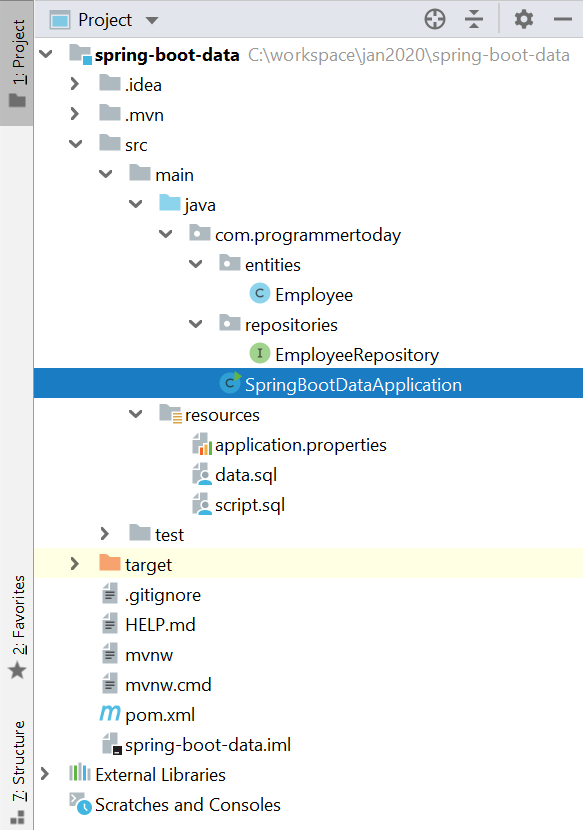
Create 2 scripts as shown in the snapshot below:
Script.sql
Drop table if exists Employee;
Create table (id number , string name, string address);
Data.sql
insert into Employee (id,name,address) values (1,'John','US');
insert into Employee (id,name,address) values (2,'Mak','UK');
5. Run Main method – @SpringBootApplication
Now just open the main class and run it.
Voila !
Your SpringBoot Spring Data JPA application is up and running @ <localhost:port>
Default port will be 8080 [ example : localhost:8080 ]
When you run the main class of SpringBootApplication, you see the below log in the console which also tells you that the h2 in-memory data base is up and runnning at url “localhost:port/h2”
2020-01-26 21:11:55.948 INFO 22204 — [ main] o.s.b.a.h2.H2ConsoleAutoConfiguration : H2 console available at ‘/h2’. Database available at ‘jdbc:h2:mem:testdb’
Open h2 db : localhost:8080/h2
H2 DB URL : localhost:8080/h2H2 DB : Employee table created on spring boot application startup
Summary
In this tutorial, we learnt about Spring boot connectivity with H2 DB an in-memory database along with Spring DATA JPA as a JPA framework. We connected with H2 in-memory database to save/persist data into the database and it’s easy to test. Hope you liked it !
In this tutorial, we will learn how to use Spring Boot with Spring data JPA and Elastic Search to index data using elastic search and search data from the indexes.
Key Benefits from this :
We will make a REST API endpoint to index data into Elastic Search.
We will also make a REST API endpoint to search data using Elastic Search from the indexed data.
We will make a REST API to reindex the data.
We will make a REST API to delete all indexes of Elastic Search.
Create an entity called Employee.class – and annotate it also with @Document with index name and its type.
package com.test.sprinbootelastic.entities;

import javax.persistence.*;
import java.io.Serializable;

@Entity
@Table(name = "Employee")
@Document(indexName = "employee", type = "employee",shards = 1)
public class Employee implements Serializable {

   private static final long serialVersionUID = -1798070786993154676L;

   @Id
   private Integer id;

   @Column(name="name")
   private String name;

   @Column(name="address")
   private String address;

   public int getId() {
       return id;
   }

   public void setId(int id) {
       this.id = id;
   }

   public String getName() {
       return name;
   }

   public void setName(String name) {
       this.name = name;
   }

   public String getAddress() {
       return address;
   }

   public void setAddress(String address) {
       this.address = address;
   }

}
3. Spring Data Repository + Elastic Search Repository
Create a Spring Data Repository Interface like below and go to the next step.
Here we created a Repository which Spring Data JPA has provided and extend a CrudRepository which provides us some boilerplate code and functionalities which helps us interact with the database just like a normal JPA or Hibernate would do.
Create a class called ElasticSearchIndexer which helps in indexing Employee entity data which was stored in the h2 or any DB.
This class will be called from the controller.
package com.test.sprinbootelastic.util;
import com.test.sprinbootelastic.elasticrepo.EmpRepository;
import com.test.sprinbootelastic.entities.Employee;
import com.test.sprinbootelastic.repository.EmployeeRepository;
import org.springframework.beans.factory.annotation.Autowired;
import org.springframework.data.elasticsearch.core.ElasticsearchOperations;
import org.springframework.stereotype.Service;
import java.util.ArrayList;
import java.util.List;
@Service
public class ElasticSearchIndexer {
@Autowired
ElasticsearchOperations operations;
@Autowired
EmpRepository empRepository;
@Autowired
EmployeeRepository employeeRepository;
public void indexData(){
System.out.println("start data indexing**********");
operations.putMapping(Employee.class);
System.out.println("Loading Data Employee");
empRepository.save(getData());
System.out.printf("Loading Completed");
}
private Iterable<Employee> getData() {
List<Employee> list = new ArrayList<Employee>();
Iterable<Employee> emps = employeeRepository.findAll();
emps.forEach(list::add);
return emps;
}
}
7. Controller – Elastic Search REST End Points
REST API endpoints for elastic search.
package com.test.sprinbootelastic.controllers;
import com.test.sprinbootelastic.elasticrepo.EmpRepository;
import com.test.sprinbootelastic.entities.Employee;
import com.test.sprinbootelastic.repository.EmployeeRepository;
import com.test.sprinbootelastic.util.ElasticSearchIndexer;
import org.springframework.beans.factory.annotation.Autowired;
import org.springframework.web.bind.annotation.*;
import java.util.ArrayList;
import java.util.List;
@RestController
@RequestMapping("api")
public class EmployeeController {
@Autowired
public EmployeeRepository employeeRepository;
@Autowired
public EmpRepository empRepository;
@Autowired
public ElasticSearchIndexer elasticSearchIndexer;
@GetMapping("/employee")
public Employee getEmployee() {
System.out.println("** This is spring boot application **");
Employee emp = new Employee();
emp = employeeRepository.findById(1);
System.out.println("employe :" + emp);
return emp;
}
/***** Elastic Search APIs *****/
@GetMapping(value = "/es/index")
public String indexEmployee() {
elasticSearchIndexer.indexData();
return "Data indexed Successfully";
}
@GetMapping(value = "/all")
public List<Employee> searchAll() {
List<Employee> usersList = new ArrayList<>();
Iterable<Employee> emps = empRepository.findAll();
emps.forEach(usersList::add);
return emps;
}
@GetMapping(value = "/es/deleteindexes")
public String deleteIndexes() {
empRepository.deleteAll();
return "Deleted all indexes";
}
}
8. Run Main method – @SpringBootApplication
Now just open the main class and run it.
Voila !
Your SpringBoot Spring Data JPA with Elastic Search application is up and running @ localhost:port
Default port will be 8080 [ example : localhost:8080 ]
You can hit the following Elastic Search REST end points like below:
localhost:8080/api/es/index : to create the indexed of the data present in db localhost:8080/api/all : to search entire Employee indexed data localhost:8080/api/deleteindexes : to delete all the indexes
Summary
In this tutorial, we learnt about Spring boot capabilities with Spring DATA Elastic Search which allows simple integration with elastic search, we created a few REST endpoints of elastic search to index and search the data. Hope you liked it !
In this tutorial, we will learn how to use Spring Boot with Spring data JPA to save data into an H2 in-memory database and how to also how to query the data.
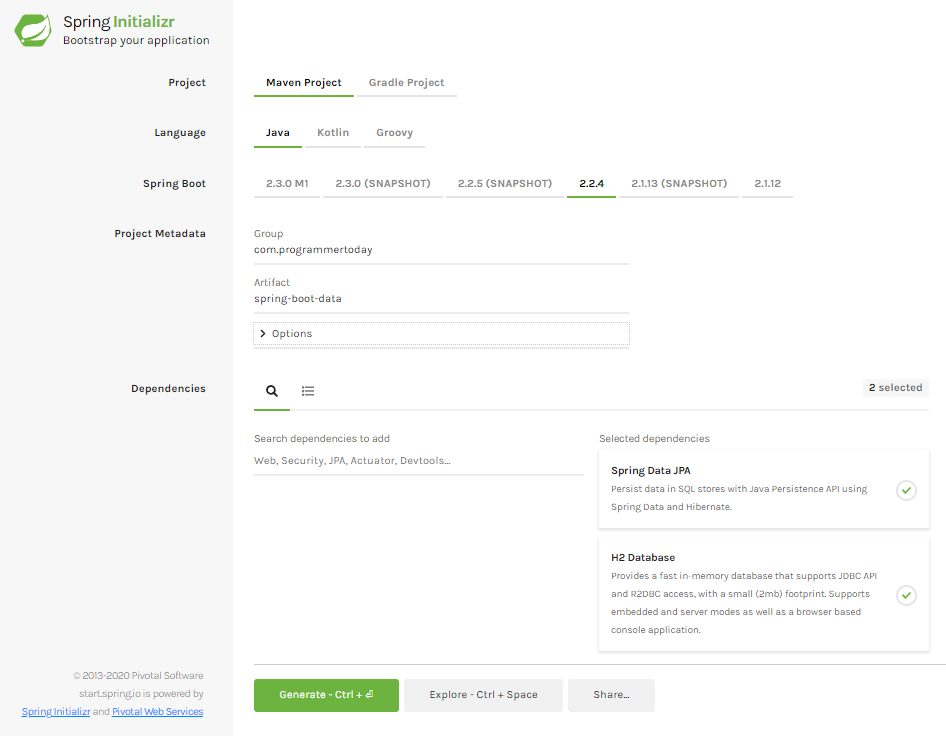
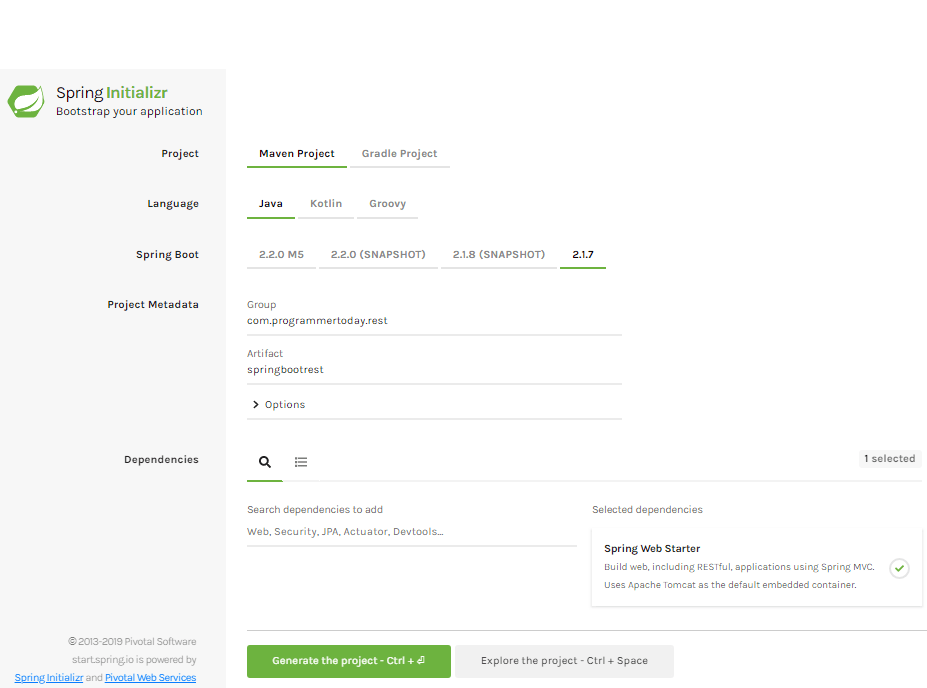
Add the 2 dependencies (spring data jpa and h2 in-memory database) and generate the project if using spring initializr Or you can also add them directly to spring boot pom.
Also add an embedded server like tomcat for the application to run, you must add a Spring Web dependency for adding tomcat in the application Or just type tomcat in spring initializr website.
package com.programmertoday.entities;
import javax.persistence.*;
import java.io.Serializable;
@Entity
@Table(name = "Employee")
public class Employee implements Serializable {
private static final long serialVersionUID = -1798070786993154676L;
@Id
private Integer id;
@Column(name="name")
private String name;
@Column(name="address")
private String address;
public int getId() {
return id;
}
public void setId(int id) {
this.id = id;
}
public String getName() {
return name;
}
public void setName(String name) {
this.name = name;
}
public String getAddress() {
return address;
}
public void setAddress(String address) {
this.address = address;
}
}
3. Spring Data Repository
Create a Spring Data Repository Interface like below and go to the next step.
Here we created a Repository which Spring Data JPA has provided and extend a CrudRepository which provides us some boilerplate code and functionalities which helps us interact with the database just like a normal JPA or Hibernate would do.
Also, Just For Testing Create two sample .sql scripts to create an Employee table and insert 2 records into that table on application load or startup.
Create 2 scripts as shown in the snapshot below:
Script.sql
Drop table if exists Employee;

Create table (id number , string name, string address);
Data.sql
insert into Employee (id,name,address) values (1,'John','US');
insert into Employee (id,name,address) values (2,'Mak','UK');
5. Run Main method – @SpringBootApplication
Now just open the main class and run it.
Voila !
Your SpringBoot Spring Data JPA application is up and running @ <localhost:port>
Default port will be 8080 [ example : localhost:8080 ]
When you run the main class of SpringBootApplication, you see the below log in the console which also tells you that the h2 in-memory data base is up and runnning at url “localhost:port/h2”
2020-01-26 21:11:55.948 INFO 22204 — [ main] o.s.b.a.h2.H2ConsoleAutoConfiguration : H2 console available at ‘/h2’. Database available at ‘jdbc:h2:mem:testdb’
Summary
In this tutorial, we learnt about Spring boot capabilities with Spring DATA JPA as a JPA framework. We connected with H2 in-memory database to save/persist data into the database and it’s easy to test. Hope you liked it !
Spring’s @Controller and @RestController Annotations
Controller : In Spring the incoming request are handled by the controllers, in terms of a web based application it is the servlet which is responsible for identifying a correct controller url.
S.No
@Controller
@RestController
1
Typically used in spring mvc applications
Typically Used in RESTful Web Services/AJAX calls which demand response in specific format like(eg: json, xml).
2
It is just @Controller , response body need to be added explicitly.
It is a combination of @Controller + @ResponseBody, It does the job in single statement.
3
It typically sends data to a view resolver in html format and is used with technologies like the JSP or FTL. To send response to REST based or AJAX calls @ResponseBody annotation is used along with @Controller.
It typically sends data back to applications like REST based or AJAX calls which is actually looking for a JSON type response and does not rely on view resolvers. In such cases use @RestController
4
If you see the code within.
@Target(value=TYPE) @Retention(value=RUNTIME) @Documented @Component public @interface Controller { //….. }
@Controller
@RequestMapping("department")
public class DepartmentController
{
    @RequestMapping(value = "/{name}", method = RequestMethod.GET)
    public Department getDepartmentByName(@PathVariable String name, Model model) {

        //pull data, set in model and then return the template

        return departmentTemplate;
    }
}
2. @Controller + @ResponseBody in spring
@Controller
@ResponseBody
@RequestMapping("department")
public class DepartmentController
{
    @RequestMapping(value = "/{name}", method = RequestMethod.GET,
                    produces ="application/json")
    public Department getDepartmentByName(@PathVariable String name) {

        //pull data, set model and then return Object model in json format

        return department;
    }
}
3. @RestController in spring
@RestController
@RequestMapping("department")
public class DepartmentController
{
    @RequestMapping(value = "/{name}", method = RequestMethod.GET,
                    produces ="application/json")
    public Department getDepartmentByName(@PathVariable String name) {

        //pull data, set model and then return Object model in json format

        return department;
    }
}
This code does the same job as in example 2 , here we use single annotation(@RestController) instead of two(@Controller, @ResponseBody).
Spring’s @RequestMapping annotation
This annotation is used to provide routing information or you can understand in a simple way it allows application to understand different apis with the help of URL, a unique URL for every api.
A sample code is here:
@RestController
public class HomeController {
@RequestMapping(value = "/allDepartmentNames", method = "GET")

    public List getAllDepartmentName(){
  //….
        return list;
    }
}
Summary
In this spring boot annotations tutorial you have learnt about annotations and auto configuration features of spring boot. These are few of the most in use annotations which you might surely use in your spring boot application. Hope you liked it !
This post will make you understand the basics of microservices and its architecture.
What you get to know :
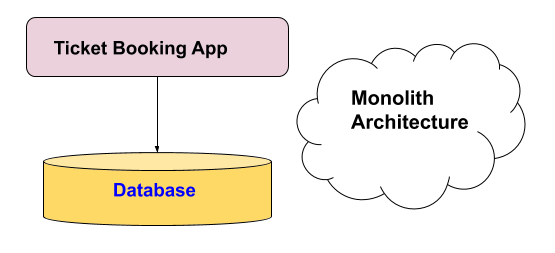
What is a Monolith application?
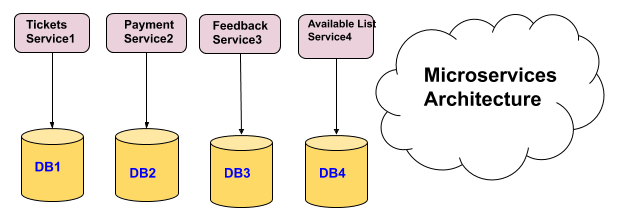
What is a Microservice?
What are the Challenges with Microservices?
How does Spring Boot and Spring Cloud make developing Microservices easy?
What is a Monolith Application?
If you have ever worked in a project of this sort where
A team is of size say more than 20 working for it
Application is of hundred thousands of lines of code.
The application has wide range of functionalities
Debugging is a big challenge
Introducing a new technology is a big challenge or nearly impossible.
And you release it to production one each month
Then the application has characteristics of a Monolith application.
Challenges which are faced here :
Scalability one of the greatest Challenges.
Difficulty in new Technology Adoption/introduction.
Adapt new Processes – like Agile?
Difficult to Automate Tests.
Difficult to Adapt to Modern Development Practices
Microservices
To overcome the challenges faced in Monolith application came the Microservices, which are scalable and easy to adapt to new technologies.
So what are Microservices ?
As defined by some experts, Developing an application as a suite of small services Each running in its own process and communicate with light weight mechanism(often as HTTP resource APIs). These services are independently deployable by automated systems and these may use independent or different data storage technologies.
So a few important characteristics which defines a microservice can be :
Small units which do their job and are easily deployable.
They communicate via HTTP REST calls or triggered event based.
Which are easily scalable.
Advantages of Microservices
New Technology & Process Adaption becomes easier. You can try new technologies with each microservice that we create.
Faster Release Cycles – You can adopt agile development methods, create microservices which are easy to maintain and deploy.
Scaling with Cloud is really simple.
Easy Automation Testing because of smaller units of microservices.
Vs
Challenges in Microservice Architectures
While developing a number of smaller components might look easy, there are a number of inherent complexities that are associated with microservices architectures.
Lets look at some of the challenges:
Fast Setup needed : You cannot spend a month setting up each microservice. You should be able to create microservices quickly.
DevOps Automation : Because there are a number of smaller components instead of a monolith application, you need to automate everything – Builds, Deployment etc.
Monitoring & Visibility : You now have a number of smaller components to deploy and maintain. Maybe 100, 1000 or maybe more. You should be able to monitor and identify problems automatically. You need great visibility around all the components.
Bounded Context : Deciding the boundaries of a microservice is not an easy task. Your understanding of the domain evolves over a period of time and so does the scope of a functionality. You need to ensure that the microservice boundaries evolve.
Configuration Management Solution : You need to maintain configurations for hundreds of components across environments so You would need a Configuration Management solution.
Configuration Management Solution : You need to maintain configurations for hundreds of components across environments so You would need a Configuration Management solution.
Fault Tolerance : If a microservice at the bottom of the call chain fails, it can have knock on effects on all other microservices. Microservices should be fault tolerant by Design so no other service bears its impact.
Debugging : When there is a problem that needs investigation, you might need to look into multiple services across different components. So the Centralized Logging and Dashboards are essential to make it easy to debug problems.
Solutions to Challenges with Microservice Architectures
One Stop solution – Spring Boot
Provide non-functional features
embedded servers (easy deployment with containers)
metrics (for monitoring)
health checks (for monitoring services)
externalized configuration
Summary
In this spring boot microservices tutorial you have learnt about monolithic and microservices architecture, challenges of monolithic arthictecure and how microservices overcome its challenges its uses advantages. Hope you liked it !
Spring Boot Actuator is a sub-project of Spring Boot. It provides several production ready features to any spring boot application. Once it is added in any spring boot application, it exposes a number of REST endpoints to monitor your application. You can monitor your application health, version details, thread dumps, logger details, application bean details, etc. without writing any code to avail these features.
After configuring spring actuator in your project, you get around 15 built-in endpoints to manage and monitor your application by default. The list of these endpoints are provided below. In case you require more control, you can also add your own endpoints. Not only this spring actuator also provide flexibility to rename the existing REST endpoints to any custom name you want.
Creating a Spring Boot application with Actuator
Two ways to do that:
Using Spring.io initializr – also select Actuator jar along with others.
By creating a spring boot project and adding Actuator Dependency to it.
This annotation is basically used on the class with main method, to mark the class as the main class of the application.
Monitoring your application through Actuator Endpoints
EndPoints
API Description
Default Value
actuator
It provides a hypermedia-based “discovery page” for the other endpoints. It requires Spring HATEOAS to be on the classpath.
True
auditevents
It exposes audit events information for the current application.
True
autoconfig
It is used to display an auto-configuration report showing all auto-configuration candidates and the reason why they ‘were’ or ‘were not’ applied.
True
beans
It is used to display a complete list of all the Spring beans in your application.
True
configprops
It is used to display a collated list of all @ConfigurationProperties.
True
dump
It is used to perform a thread dump.
True
env
It is used to expose properties from Spring’s ConfigurableEnvironment.
True
flyway
It is used to show any Flyway database migrations that have been applied.
True
health
It is used to show application health information.
False
info
It is used to display arbitrary application info.
False
loggers
It is used to show and modify the configuration of loggers in the application.
True
liquibase
It is used to show any Liquibase database migrations that have been applied.
True
Metrics
It is used to show metrics information for the current application.
True
mappings
It is used to display a collated list of all @RequestMapping paths.
True
shutdown
It is used to allow the application to be gracefully shutdown.
True
trace
It is used to display trace information.
True
Enabling and Disabling Actuator Endpoints
By Default it Exposes 2 endpoint(s) beneath base path ‘/actuator’
You can enable or disable an actuator endpoint by setting the property management.endpoint.id. enabled to true or false (where id is the identifier for the endpoint).
For example, to enable the shutdown endpoint, add the following to your application.properties file –
management.endpoint.shutdown.enabled=true
Exposing Actuator Endpoints
To enable the rest of the 15 endpoints , add the following to you applicaiton.properties
management.endpoints.web.exposure.include=*
Or if you want to expose only specific endpoint , then add the following to properties file
management.endpoints.web.exposure.include=health,info // this will enable only health and info rest end points.
Summary
In this spring boot actuator tutorial you have learnt about actuator and the amount of apis if offers to help you monitor and manage your applications health. These features you must add and explore in your spring boot application. Hope you liked it !
Spring Boot REST Controller – make a REST controller
@RestController Annotation used on the controller class.
@GetMapping & @PostMapping used to declare get and post apis.
Property consumes & produces used to consume and produce data of different types for example json, xml, html.
Step 2 : Create Get API
Create a class as below, copy and paste the code in you IDE.
import org.springframework.web.bind.annotation.GetMapping;
import org.springframework.web.bind.annotation.RequestBody;
import org.springframework.web.bind.annotation.RequestMapping;
import org.springframework.web.bind.annotation.RestController;

@RestController
@RequestMapping("api")
public class DepartmentController{

	@GetMapping("/hello")
	public String helloWorld() {

		return "Hello World !";

	}

	@GetMapping(path = "/dept", produces = "application/json")
	public Department getDepartment() {

		return new Department("Information Technology", "IT");
	}
}
Step 3 : Create Post API
Create a class as below, copy and paste the code in you IDE.
import org.springframework.web.bind.annotation.PostMapping;
import org.springframework.web.bind.annotation.RequestBody;
import org.springframework.web.bind.annotation.RequestMapping;
import org.springframework.web.bind.annotation.RestController;

@RestController
@RequestMapping("api")
public class DepartmentController{

  @PostMapping(path = "/dept", produces = "application/json",
              consumes = "application/json")
  public String  addDepartment(@RequestBody Department department) {

    return department.getDepCode()+"--"+department.getDepName();

  }
}
Step 4 : main method using @SpringBootApplication
Create a class with main method as below, copy and paste the code in you IDE, key point here is we are using @SpringBootApplication annotation to notify the framework that this is our main springboot class
package com.programmer.actuator;

import org.springframework.boot.SpringApplication;
import org.springframework.boot.autoconfigure.SpringBootApplication;

@SpringBootApplication
public class SpringbootprojectApplication {

  public static void main(String[] args) {
    SpringApplication.run(SpringbootprojectApplication.class, args);
  }

}
Result
You can download a REST client or create your own and test the GET and POST apis as below.
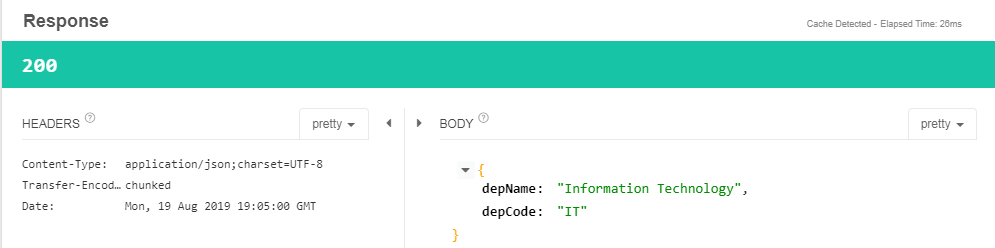
GET API Response – When we hit the GET api see the snapshots below
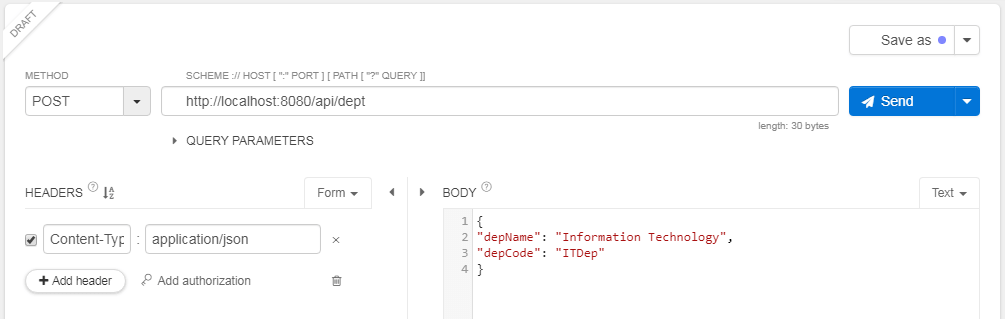
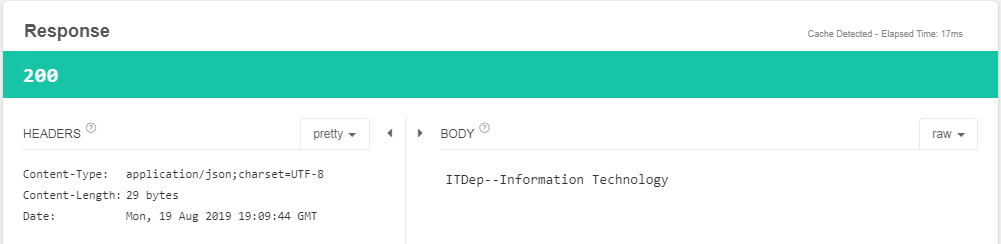
POST API Response – When we hit the POST api see the snapshots below
Summary
In this section we learnt how to create a simple REST based project with SPRING BOOT. Hope you enjoyed it !