
Spring Boot – with H2 in memory database

In this tutorial, we will learn how to use Spring Boot with Spring data JPA to save data into an H2 in-memory database and how to also how to query the data.

Final Project Structure : Will look like this
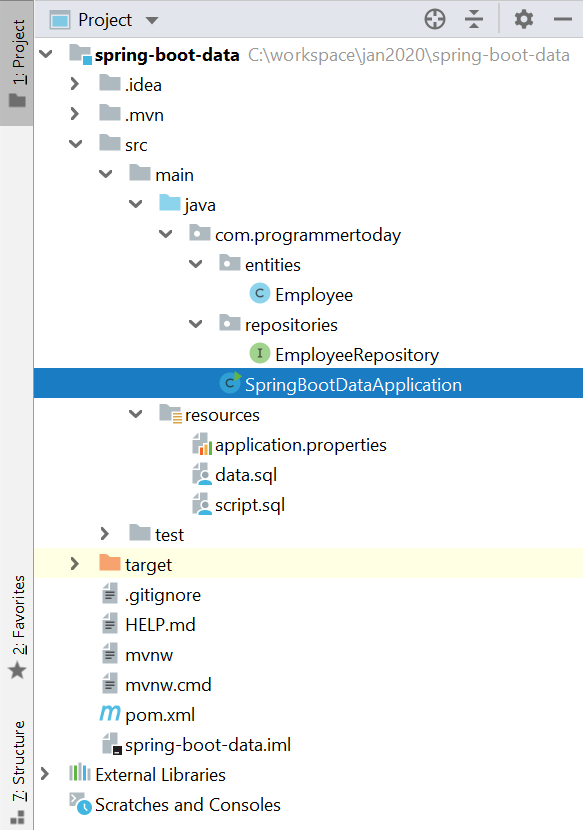
1. Add Maven Dependency Or use Spring Initializr

Add the 3 dependencies :

  • Spring Data jpa
  • H2 in-memory database
  • Spring web – for tomcat

and generate the project if using spring initializr Or you can also add them directly to spring boot pom.
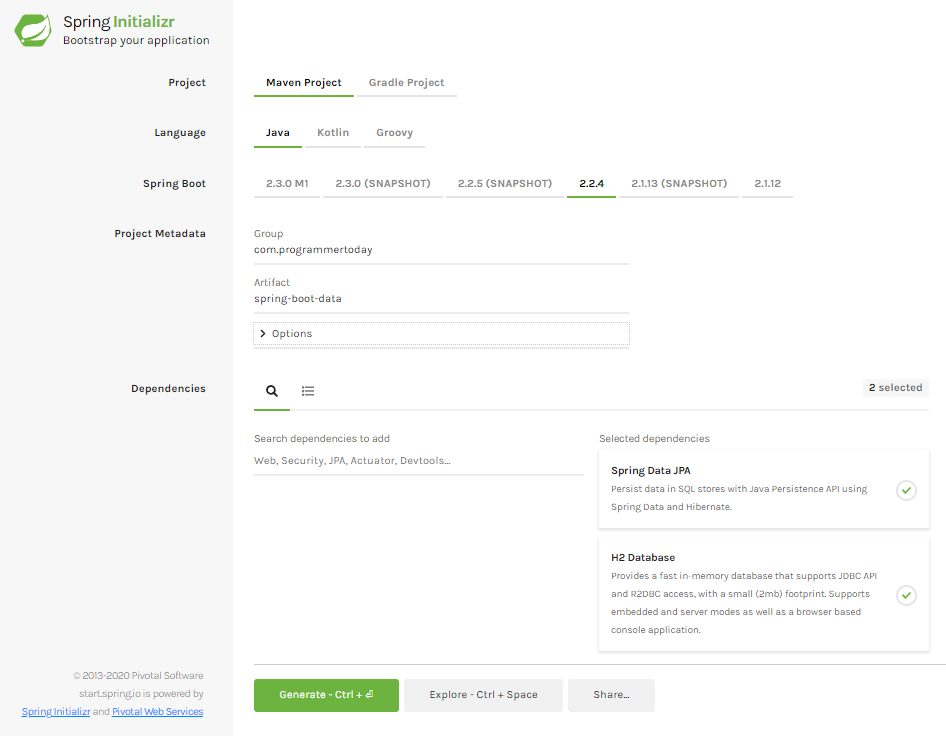
So the pom.xml file will look like this.


<?xml version="1.0" encoding="UTF-8"?>
<project xmlns="http://maven.apache.org/POM/4.0.0" xmlns:xsi="http://www.w3.org/2001/XMLSchema-instance"
  xsi:schemaLocation="http://maven.apache.org/POM/4.0.0 https://maven.apache.org/xsd/maven-4.0.0.xsd">
  <modelVersion>4.0.0</modelVersion>
  <parent>
     <groupId>org.springframework.boot</groupId>
     <artifactId>spring-boot-starter-parent</artifactId>
     <version>2.2.4.RELEASE</version>
     <relativePath/> <!-- lookup parent from repository -->
  </parent>
  <groupId>com.programmertoday</groupId>
  <artifactId>spring-boot-data</artifactId>
  <version>0.0.1-SNAPSHOT</version>
  <name>spring-boot-data</name>
  <description>Demo project for Spring Boot</description>

  <properties>
     <java.version>1.8</java.version>
  </properties>

  <dependencies>
     <dependency>
        <groupId>org.springframework.boot</groupId>
        <artifactId>spring-boot-starter-data-jpa</artifactId>
     </dependency>
     <dependency>
        <groupId>com.h2database</groupId>
        <artifactId>h2</artifactId>
        <scope>runtime</scope>
     </dependency>
     <dependency>
        <groupId>org.springframework.boot</groupId>
        <artifactId>spring-boot-starter-web</artifactId>
     </dependency>
     <dependency>
        <groupId>org.springframework.boot</groupId>
        <artifactId>spring-boot-starter-test</artifactId>
        <scope>test</scope>
        <exclusions>
           <exclusion>
              <groupId>org.junit.vintage</groupId>
              <artifactId>junit-vintage-engine</artifactId>
           </exclusion>
        </exclusions>
     </dependency>
  </dependencies>

  <build>
     <plugins>
        <plugin>
           <groupId>org.springframework.boot</groupId>
           <artifactId>spring-boot-maven-plugin</artifactId>
        </plugin>
     </plugins>
  </build>

</project>

2. Create : Spring Data Entity

Create an entity called Employee.class

package com.programmertoday.entities;

import javax.persistence.*;
import java.io.Serializable;

@Entity
@Table(name = "Employee")
public class Employee implements Serializable {

   private static final long serialVersionUID = -1798070786993154676L;

   @Id
   private Integer id;

   @Column(name="name")
   private String name;

   @Column(name="address")
   private String address;

   public int getId() {
       return id;
   }

   public void setId(int id) {
       this.id = id;
   }

   public String getName() {
       return name;
   }

   public void setName(String name) {
       this.name = name;
   }

   public String getAddress() {
       return address;
   }

   public void setAddress(String address) {
       this.address = address;
   }

}

3. Spring Data Repository

Create a Spring Data Repository Interface like below and go to the next step.

Here we created a Repository which Spring Data JPA has provided and extend a CrudRepository which provides us some boilerplate code and functionalities which helps us interact with the database just like a normal JPA or Hibernate would do.

package com.programmertoday.repositories;

import com.programmertoday.entities.Employee;
import org.springframework.data.repository.CrudRepository;

public interface EmployeeRepository extends CrudRepository<Employee,Integer> {
}

4. Connection with H2 in-memory database

1.> Just add the below 2 properties for h2 db in application.properties file :

spring.h2.console.enabled=true
spring.h2.console.path=/h2

2.> Also, Just For Testing Create two sample .sql scripts to create an Employee table and insert 2 records into that table on application load or startup.

Create 2 scripts as shown in the snapshot below:

Script.sql

Drop table if exists Employee;
Create table (id number , string name, string address); 

Data.sql

insert into Employee (id,name,address) values (1,'John','US');
insert into Employee (id,name,address) values (2,'Mak','UK'); 

5. Run Main method – @SpringBootApplication

Now just open the main class and run it.

Voila ! 

Your SpringBoot Spring Data JPA application is up and running @ <localhost:port>

Default port will be 8080 [ example : localhost:8080 ]

When you run the main class of SpringBootApplication, you see the below log in the console which also tells you that the h2 in-memory data base is up and runnning at url “localhost:port/h2”

2020-01-26 21:11:55.948  INFO 22204 — [   main] o.s.b.a.h2.H2ConsoleAutoConfiguration    : H2 console available at ‘/h2’. Database available at ‘jdbc:h2:mem:testdb’

Open h2 db : localhost:8080/h2

H2 DB URL : localhost:8080/h2
H2 DB : Employee table created on spring boot application startup

Summary

In this tutorial, we learnt about Spring boot connectivity with H2 DB an in-memory database along with Spring DATA JPA as a JPA framework. We connected with H2 in-memory database to save/persist data into the database and it’s easy to test.
Hope you liked it !


Spring Boot – Elastic Search with Spring Data JPA

In this tutorial, we will learn how to use Spring Boot with Spring data JPA and Elastic Search to index data using elastic search and search data from the indexes.

Key Benefits from this :

  • We will make a REST API endpoint to index data into Elastic Search.
  • We will also make a REST API endpoint to search data using Elastic Search from the indexed data.
  • We will make a REST API to reindex the data.
  • We will make a REST API to delete all indexes of Elastic Search.

Final Project Structure will look like this

springboot-elastic-search-project-structure

1. Add Maven Dependency Or use Spring Initializr

Add the 4 dependencies 

  • spring data jpa
  • h2 in-memory database
  • Elastic search 
  • Spring web – for tomcat and spring REST 

and generate the project if using spring initializr Or you can also add them directly to spring boot pom.xml.

So the Pom file will look like this.

<?xml version="1.0" encoding="UTF-8"?>
<project xmlns="http://maven.apache.org/POM/4.0.0" xmlns:xsi="http://www.w3.org/2001/XMLSchema-instance"
  xsi:schemaLocation="http://maven.apache.org/POM/4.0.0 https://maven.apache.org/xsd/maven-4.0.0.xsd">
  <modelVersion>4.0.0</modelVersion>
  <parent>
     <groupId>org.springframework.boot</groupId>
     <artifactId>spring-boot-starter-parent</artifactId>
     <version>1.5.9.RELEASE</version>
     <relativePath/> <!-- lookup parent from repository -->
  </parent>
  <groupId>com.test</groupId>
  <artifactId>sprinbootelastic</artifactId>
  <version>0.0.1-SNAPSHOT</version>
  <name>sprinbootelastic</name>
  <description>Demo project for Spring Boot</description>

  <properties>
     <java.version>1.8</java.version>
  </properties>

  <dependencies>
     <dependency>
        <groupId>org.springframework.boot</groupId>
        <artifactId>spring-boot-starter-data-elasticsearch</artifactId>
     </dependency>
     <dependency>
        <groupId>org.springframework.boot</groupId>
        <artifactId>spring-boot-starter-data-jpa</artifactId>
     </dependency>
     <dependency>
        <groupId>org.springframework.boot</groupId>
        <artifactId>spring-boot-starter-web</artifactId>
     </dependency>

     <dependency>
        <groupId>com.h2database</groupId>
        <artifactId>h2</artifactId>
        <scope>runtime</scope>
     </dependency>
     <dependency>
        <groupId>org.springframework.boot</groupId>
        <artifactId>spring-boot-starter-test</artifactId>
        <scope>test</scope>
        <exclusions>
           <exclusion>
              <groupId>org.junit.vintage</groupId>
              <artifactId>junit-vintage-engine</artifactId>
           </exclusion>
        </exclusions>
     </dependency>
     <dependency>
        <groupId>org.elasticsearch.client</groupId>
        <artifactId>transport</artifactId>
        <version>6.8.6</version>
     </dependency>
  </dependencies>

  <build>
     <plugins>
        <plugin>
           <groupId>org.springframework.boot</groupId>
           <artifactId>spring-boot-maven-plugin</artifactId>
        </plugin>
     </plugins>
  </build>

</project>

2. Create : Spring Data Entity

Create an entity called Employee.class – and annotate it also with @Document with index name and its type.

package com.test.sprinbootelastic.entities;

import javax.persistence.*;
import java.io.Serializable;

@Entity
@Table(name = "Employee")
@Document(indexName = "employee", type = "employee",shards = 1)
public class Employee implements Serializable {

   private static final long serialVersionUID = -1798070786993154676L;

   @Id
   private Integer id;

   @Column(name="name")
   private String name;

   @Column(name="address")
   private String address;

   public int getId() {
       return id;
   }

   public void setId(int id) {
       this.id = id;
   }

   public String getName() {
       return name;
   }

   public void setName(String name) {
       this.name = name;
   }

   public String getAddress() {
       return address;
   }

   public void setAddress(String address) {
       this.address = address;
   }

}

3. Spring Data Repository + Elastic Search Repository

Create a Spring Data Repository Interface like below and go to the next step.

Here we created a Repository which Spring Data JPA has provided and extend a CrudRepository which provides us some boilerplate code and functionalities which helps us interact with the database just like a normal JPA or Hibernate would do.

package com.test.sprinbootelastic.repository;

import com.test.sprinbootelastic.entities.Employee;
import org.springframework.data.repository.CrudRepository;

public interface EmployeeRepository  extends CrudRepository<Employee,Integer> {

   Employee findById(int id);

}

Also create an Elastic Search Repository

package com.test.sprinbootelastic.elasticrepo;

import com.test.sprinbootelastic.entities.Employee;
import org.springframework.data.elasticsearch.repository.ElasticsearchRepository;
import org.springframework.stereotype.Repository;

@Repository
public interface EmpRepository extends ElasticsearchRepository<Employee,Integer> {
}

4. Connection with H2 in-memory database

Just add the below 2 properties for h2 db in application.properties

spring.h2.console.enabled=true
spring.h2.console.path=/h2

Also, Just For Testing Create two sample .sql scripts to create an Employee table and insert 2 records into that table on application load or startup.

Create 2 scripts as shown in the snapshot below:

h2-springboot-properties

Script.sql

Drop table if exists Employee;

Create table (id number , string name, string address);

Data.sql

insert into Employee (id,name,address) values (1,'John','US');
insert into Employee (id,name,address) values (2,'Mak','UK');

5. Config – Elastic Search

Create a Config Class file for elastic search configuration

package com.test.sprinbootelastic;

import org.elasticsearch.common.settings.Settings;
import org.elasticsearch.node.NodeBuilder;
import org.springframework.beans.factory.annotation.Value;
import org.springframework.context.annotation.Bean;
import org.springframework.context.annotation.ComponentScan;
import org.springframework.context.annotation.Configuration;
import org.springframework.data.elasticsearch.core.ElasticsearchOperations;
import org.springframework.data.elasticsearch.core.ElasticsearchTemplate;
import org.springframework.data.elasticsearch.repository.config.EnableElasticsearchRepositories;
import org.springframework.data.jpa.repository.config.EnableJpaRepositories;

import java.io.File;
import java.io.IOException;

@Configuration
@EnableElasticsearchRepositories(basePackages = "com.test.sprinbootelastic.elasticrepo")
@EnableJpaRepositories(basePackages = "com.test.sprinbootelastic.repository")
@ComponentScan(basePackages = {"com.test.sprinbootelastic"})
public class Config {

   @Value("${elasticsearch.home:C:/Users/programmertoday/test}")
   private String elasticsearchHome;

   @Value("${elasticsearch.cluster.name:elastic-1}")
   private String clusterName;

   @Bean
   public NodeBuilder nodeBuilder() {
       return new NodeBuilder();
   }

   @Bean
   public ElasticsearchOperations elasticsearchTemplate() throws IOException {
       File tmpDir = File.createTempFile("elastic1", Long.toString(System.nanoTime()));
       System.out.println("Temp directory: " + tmpDir.getAbsolutePath());
       Settings.Builder elasticsearchSettings =
               Settings.settingsBuilder()
                       .put("http.enabled", "true") // 1
                       .put("index.number_of_shards", "1")
                       .put("path.data", new File(tmpDir, "data").getAbsolutePath()) // 2
                       .put("path.logs", new File(tmpDir, "logs").getAbsolutePath()) // 2
                       .put("path.work", new File(tmpDir, "work").getAbsolutePath()) // 2
                       .put("path.home", tmpDir); // 3


       return new ElasticsearchTemplate(nodeBuilder()
               .local(true)
               .settings(elasticsearchSettings.build())
               .node()
               .client());
   }
}

6. Class ElasticSearchIndexer.class

Create a class called ElasticSearchIndexer which helps in indexing Employee entity data which was stored in the h2 or any DB.

This class will be called from the controller.

package com.test.sprinbootelastic.util;

import com.test.sprinbootelastic.elasticrepo.EmpRepository;
import com.test.sprinbootelastic.entities.Employee;
import com.test.sprinbootelastic.repository.EmployeeRepository;
import org.springframework.beans.factory.annotation.Autowired;
import org.springframework.data.elasticsearch.core.ElasticsearchOperations;
import org.springframework.stereotype.Service;

import java.util.ArrayList;
import java.util.List;

@Service
public class ElasticSearchIndexer {

   @Autowired
   ElasticsearchOperations operations;

   @Autowired
   EmpRepository empRepository;

   @Autowired
   EmployeeRepository employeeRepository;

   public void indexData(){
       System.out.println("start data indexing**********");
       operations.putMapping(Employee.class);
       System.out.println("Loading Data Employee");
       empRepository.save(getData());
       System.out.printf("Loading Completed");
   }

   private Iterable<Employee> getData() {
       List<Employee> list = new ArrayList<Employee>();
       Iterable<Employee> emps = employeeRepository.findAll();
       emps.forEach(list::add);
       return emps;
   }

}

7. Controller – Elastic Search REST End Points

REST API endpoints for elastic search.

package com.test.sprinbootelastic.controllers;

import com.test.sprinbootelastic.elasticrepo.EmpRepository;
import com.test.sprinbootelastic.entities.Employee;
import com.test.sprinbootelastic.repository.EmployeeRepository;
import com.test.sprinbootelastic.util.ElasticSearchIndexer;
import org.springframework.beans.factory.annotation.Autowired;
import org.springframework.web.bind.annotation.*;

import java.util.ArrayList;
import java.util.List;

@RestController
@RequestMapping("api")
public class EmployeeController {

   @Autowired
   public EmployeeRepository employeeRepository;
   @Autowired
   public EmpRepository empRepository;
   @Autowired
   public ElasticSearchIndexer elasticSearchIndexer;

   @GetMapping("/employee")
   public Employee getEmployee() {
       System.out.println("** This is spring boot application **");
       Employee emp = new Employee();
       emp = employeeRepository.findById(1);
       System.out.println("employe :" + emp);
       return emp;
   }

   /***** Elastic Search APIs *****/

   @GetMapping(value = "/es/index")
   public String indexEmployee() {
       elasticSearchIndexer.indexData();
       return "Data indexed Successfully";
   }

   @GetMapping(value = "/all")
   public List<Employee> searchAll() {
       List<Employee> usersList = new ArrayList<>();
       Iterable<Employee> emps = empRepository.findAll();
       emps.forEach(usersList::add);
       return emps;
   }

   @GetMapping(value = "/es/deleteindexes")
   public String deleteIndexes() {
       empRepository.deleteAll();
       return "Deleted all indexes";
   }


}

8. Run Main method – @SpringBootApplication

Now just open the main class and run it.

Voila ! 

Your SpringBoot Spring Data JPA with Elastic Search application is up and running @ localhost:port

Default port will be 8080 [ example : localhost:8080 ]

You can hit the following Elastic Search REST end points like below:

localhost:8080/api/es/index : to create the indexed of the data present in db
localhost:8080/api/all : to search entire Employee indexed data
localhost:8080/api/deleteindexes : to delete all the indexes

Summary

In this tutorial, we learnt about Spring boot capabilities with Spring DATA Elastic Search which allows simple integration with elastic search, we created a few REST endpoints of elastic search to index and search the data.
Hope you liked it !


Spring Boot – Spring data JPA

In this tutorial, we will learn how to use Spring Boot with Spring data JPA to save data into an H2 in-memory database and how to also how to query the data.

Final Project Structure : Will look like this

1. Add Maven Dependency Or use Spring Initializr

Add the 2 dependencies (spring data jpa and h2 in-memory database) and generate the project if using spring initializr Or you can also add them directly to spring boot pom.

Also add an embedded server like tomcat for the application to run, you must add a Spring Web dependency for adding tomcat in the application Or just type tomcat in spring initializr website.

So the pom.xml file will look like this.


<?xml version="1.0" encoding="UTF-8"?>
<project xmlns="http://maven.apache.org/POM/4.0.0" xmlns:xsi="http://www.w3.org/2001/XMLSchema-instance"
  xsi:schemaLocation="http://maven.apache.org/POM/4.0.0 https://maven.apache.org/xsd/maven-4.0.0.xsd">
  <modelVersion>4.0.0</modelVersion>
  <parent>
     <groupId>org.springframework.boot</groupId>
     <artifactId>spring-boot-starter-parent</artifactId>
     <version>2.2.4.RELEASE</version>
     <relativePath/> <!-- lookup parent from repository -->
  </parent>
  <groupId>com.programmertoday</groupId>
  <artifactId>spring-boot-data</artifactId>
  <version>0.0.1-SNAPSHOT</version>
  <name>spring-boot-data</name>
  <description>Demo project for Spring Boot</description>

  <properties>
     <java.version>1.8</java.version>
  </properties>

  <dependencies>
     <dependency>
        <groupId>org.springframework.boot</groupId>
        <artifactId>spring-boot-starter-data-jpa</artifactId>
     </dependency>
     <dependency>
        <groupId>com.h2database</groupId>
        <artifactId>h2</artifactId>
        <scope>runtime</scope>
     </dependency>
     <dependency>
        <groupId>org.springframework.boot</groupId>
        <artifactId>spring-boot-starter-web</artifactId>
     </dependency>
     <dependency>
        <groupId>org.springframework.boot</groupId>
        <artifactId>spring-boot-starter-test</artifactId>
        <scope>test</scope>
        <exclusions>
           <exclusion>
              <groupId>org.junit.vintage</groupId>
              <artifactId>junit-vintage-engine</artifactId>
           </exclusion>
        </exclusions>
     </dependency>
  </dependencies>

  <build>
     <plugins>
        <plugin>
           <groupId>org.springframework.boot</groupId>
           <artifactId>spring-boot-maven-plugin</artifactId>
        </plugin>
     </plugins>
  </build>

</project>

2. Create : Spring Data Entity

Create an entity called Employee.class

package com.programmertoday.entities;

import javax.persistence.*;
import java.io.Serializable;

@Entity
@Table(name = "Employee")
public class Employee implements Serializable {

   private static final long serialVersionUID = -1798070786993154676L;

   @Id
   private Integer id;

   @Column(name="name")
   private String name;

   @Column(name="address")
   private String address;

   public int getId() {
       return id;
   }

   public void setId(int id) {
       this.id = id;
   }

   public String getName() {
       return name;
   }

   public void setName(String name) {
       this.name = name;
   }

   public String getAddress() {
       return address;
   }

   public void setAddress(String address) {
       this.address = address;
   }

}

3. Spring Data Repository

Create a Spring Data Repository Interface like below and go to the next step.

Here we created a Repository which Spring Data JPA has provided and extend a CrudRepository which provides us some boilerplate code and functionalities which helps us interact with the database just like a normal JPA or Hibernate would do.

package com.programmertoday.repositories;

import com.programmertoday.entities.Employee;
import org.springframework.data.repository.CrudRepository;

public interface EmployeeRepository extends CrudRepository<Employee,Integer> {
}

4. Connection with H2 in-memory database

Just add the below 2 properties for h2 db:

spring.h2.console.enabled=true
spring.h2.console.path=/h2

Also, Just For Testing Create two sample .sql scripts to create an Employee table and insert 2 records into that table on application load or startup.

Create 2 scripts as shown in the snapshot below:

Script.sql

Drop table if exists Employee;
Create table (id number , string name, string address);

Data.sql

insert into Employee (id,name,address) values (1,'John','US');
insert into Employee (id,name,address) values (2,'Mak','UK');

5. Run Main method – @SpringBootApplication

Now just open the main class and run it.

Voila ! 

Your SpringBoot Spring Data JPA application is up and running @ <localhost:port>

Default port will be 8080 [ example : localhost:8080 ]

When you run the main class of SpringBootApplication, you see the below log in the console which also tells you that the h2 in-memory data base is up and runnning at url “localhost:port/h2”

2020-01-26 21:11:55.948  INFO 22204 — [   main] o.s.b.a.h2.H2ConsoleAutoConfiguration    : H2 console available at ‘/h2’. Database available at ‘jdbc:h2:mem:testdb’

Summary

In this tutorial, we learnt about Spring boot capabilities with Spring DATA JPA as a JPA framework. We connected with H2 in-memory database to save/persist data into the database and it’s easy to test.
Hope you liked it !


@angular/core APIs

Implements Angular’s core functionality, low-level services, and utilities.

Some of the core classes/interfaces/functions are as follows :

1. EventEmitter

It is a Class, In Angular, a component can emit an event using @Output and EventEmitter. Both are parts of the @angular/core.
It emit custom events synchronously or asynchronously, and register handlers for those events by subscribing to an instance.

appchild.component.ts

import { Component, EventEmitter, Output } from '@angular/core';
@Component({
    selector: 'app-child',
    template: `<button class='btn btn-primary' (click)="valueChanged()">Click me</button> `
})
export class AppChildComponent {
    @Output() valueChange = new EventEmitter();
    Counter = 0;
    valueChanged() { // You can give any function name
        this.counter = this.counter + 1;
        this.valueChange.emit(this.counter);
    }
}

to emit values in the parent component.

2. OnDestroy

It is an interface, it is a lifecycle hook that is called when a directive, pipe, or service is destroyed. Use for any custom cleanup that needs to occur when the instance is destroyed.

// its own Definition

interface OnDestroy {
  ngOnDestroy(): void
}
// Usage of ngOnDestroy()

@Component({selector: 'my-cmp', template: `...`})
class MyComponent implements OnDestroy {
  ngOnDestroy() {
    // ...
  }
}

3. OnInit

It is an interface, it is a lifecycle hook that is called after Angular has initialized all data-bound properties of a directive. Define an ngOnInit() method to handle any additional initialization tasks.
It is invoked only once when the directive is instantiated.

// its own Definition

interface OnInit {
  ngOnInit(): void
}
// Usage of ngOnInit()

@Component({selector: 'my-cmp', template: `...`})
class MyComponent implements OnInit {
  ngOnInit() {
    // ...
  }
}

4. ViewChild

It is one of the decorators, it is a Property decorator that configures a view query. The change detector looks for the first element or the directive matching the selector in the view DOM. If the view DOM changes, and a new child matches the selector, the property is updated.

// EXAMPLE

import {Component, Directive, Input, ViewChild} from '@angular/core';

@Directive({selector: 'pane'})
export class Pane {
  @Input() id !: string;
}

@Component({
  selector: 'example-app',
  template: `
    <pane id="1" *ngIf="shouldShow"></pane>
    <pane id="2" *ngIf="!shouldShow"></pane>

    <button (click)="toggle()">Toggle</button>

    <div>Selected: {{selectedPane}}</div>
  `,
})
export class ViewChildComp {
  @ViewChild(Pane, {static: false})
  set pane(v: Pane) {
    setTimeout(() => { this.selectedPane = v.id; }, 0);
  }
  selectedPane: string = '';
  shouldShow = true;
  toggle() { this.shouldShow = !this.shouldShow; }
}

Summary

In this tutorial we learnt about the angular core APIs , few classes, interfaces and functions.
Hope you like it !


Angular – RxJS Classes and functions

RxJS (Reactive Extensions for JavaScript) is a library for reactive programming using observables that makes it easier to compose asynchronous or callback-based code.

RxJS provides an implementation of the Observable type, The library also provides utility functions for creating and working with observables.

RxJs Classes & functions

1. Observable

A representation of any set of values over any amount of time. This is the most basic building block of RxJS.

import { Observable } from 'rxjs';
 
const foo = new Observable(subscriber => {
  console.log('Hello');
  subscriber.next(42);
});
 
foo.subscribe(x => {
  console.log(x);
});
foo.subscribe(y => {
  console.log(y);
});

OUTPUT

"Hello"
42
"Hello"
42

2. BehaviorSubject

Requires an initial value and emits the current value to new subscribers

import { BehaviorSubject } from 'rxjs';

const subject = new BehaviorSubject(11);

// two new subscribers will get initial value => output: 11, 11
subject.subscribe(console.log);

// two subscribers will get new value => output: 22, 22
subject.next(22);

// new subscriber will get latest value (22) => output: 22
subject.subscribe(console.log);

// all three subscribers will get new value => output: 33, 33, 33
subject.next(33);

// OUTPUT :: 11, 11, 22, 22, 22, 33, 33, 33

3. combineLatest

Combines multiple Observables to create an Observable whose values are calculated from the latest values of each of its input Observables.

import { combineLatest, timer } from 'rxjs';

const firstTimer = timer(0, 1000); // emit 0, 1, 2... after every second, starting from now
const secondTimer = timer(500, 1000); // emit 0, 1, 2... after every second, starting 0,5s from now

const combinedTimers = combineLatest(firstTimer, secondTimer);
combinedTimers.subscribe(value => console.log(value));

// OUTPUT Logged
// [0, 0] after 0.5s
// [1, 0] after 1s
// [1, 1] after 1.5s
// [2, 1] after 2s

Summary

In this tutorial we learnt about few important classes of RxJS and its functions.
Hope you like it !


Angular – RxJS Operators

RxJS (Reactive Extensions for JavaScript) is a library for reactive programming using observables that makes it easier to compose asynchronous or callback-based code.

RxJS provides an implementation of the Observable type, The library also provides utility functions for creating and working with observables.

 These utility functions can be used for:

  • Converting existing code for async operations into observables
  • Iterating through the values in a stream
  • Mapping values to different types
  • Filtering streams
  • Composing multiple streams

RxJS Operators

1. of() – Emit variable amount of values in a sequence and then emits a complete notification.

import { of } from 'rxjs';
//emits any number of provided values in sequence
const source = of(1, 2, 3, 4, 5);
//output: 1,2,3,4,5
const subscribe = source.subscribe(val => console.log(val));

2. Tap() – Transparently perform actions, such as logging.

import { of } from 'rxjs';
import { tap, map } from 'rxjs/operators';

const source = of(1, 2, 3, 4, 5);
// transparently log values from source with 'tap'
const example = source.pipe(
  tap(val => console.log(`BEFORE MAP: ${val}`)),
  map(val => val + 10),
  tap(val => console.log(`AFTER MAP: ${val}`))
);

//'tap' does not transform values
//output: 11...12...13...14...15
const subscribe = example.subscribe(val => console.log(val));

OUTPUT

BEFORE MAP: 1
AFTER MAP: 11
11
BEFORE MAP: 2
AFTER MAP: 12
12
BEFORE MAP: 3
AFTER MAP: 13
13

3. map() – Apply projection with each value from source.

import { from } from 'rxjs';
import { map } from 'rxjs/operators';

//emit (1,2,3,4,5)
const source = from([1, 2, 3, 4, 5]);
//add 10 to each value
const example = source.pipe(map(val => val + 10));
//output: 11,12,13,14,15
const subscribe = example.subscribe(val => console.log(val));

OUTPUT

11
12
13
14
15

4. debounceTime() – Discard emitted values that take less than the specified time between output.

import { fromEvent } from 'rxjs';
import { debounceTime, map } from 'rxjs/operators';

// elem ref
const searchBox = document.getElementById('search');

// streams
const keyup$ = fromEvent(searchBox, 'keyup');

// wait .5s between keyups to emit current value
keyup$
  .pipe(
    map((i: any) => i.currentTarget.value),
    debounceTime(500)
  )
  .subscribe(console.log);

OUTPUT – On every keyup press, it waits for 500 milisec to log in console and discards the button press in between.

Note :- that in the call stack, it’s Observable.subscribe that kicks everything off. Because observables tend to be lazy, no data will flow through the pipe and map until we subscribe to the observable.

5. startWith() – Returns an Observable that emits the items you specify as arguments before it begins to emit items emitted by the source Observable.

import { of } from 'rxjs';
import { startWith } from 'rxjs/operators';

of(1,2,3)
  .pipe(startWith("first", "second"))
  .subscribe(x => console.log(x));

// OUTPUT ::
//   "first"
//   "second"
//   1
//   2
//   3

6. distinctUntilChanged() – Returns an Observable that emits all items emitted by the source Observable that are distinct by comparison from the previous item.

import { of } from 'rxjs';
import { distinctUntilChanged } from 'rxjs/operators';

of(1, 1, 2, 2, 2, 2, 2, 1, 1, 2, 3, 3, 4).pipe(
    distinctUntilChanged(),
  )
  .subscribe(x => console.log(x)); // OUTPUT : 1, 2, 1, 2, 3, 4

7. takeUntil() – Emits the values emitted by the source Observable until a notifier Observable emits a value.

import { fromEvent, interval } from 'rxjs';
import { takeUntil } from 'rxjs/operators';

const source1 = interval(1000);
const clicks = fromEvent(document, 'click');
const result = source1.pipe(takeUntil(clicks));
result.subscribe(x => console.log(x));

// OUTPUT:
// It will keep on logging in console number like 0, 1, 2, 3 and so on 
// until a mouse click is seen.

Pipe()

Unlike tap,map, which are operators, pipe is a method on Observable which is used for composing operators. pipe was introduced to RxJS in v5.5.

Example :

converting this

of(1,2,3).map(x => x + 1).filter(x => x > 2);

into this

of(1,2,3).pipe(
  map(x => x + 1),
  filter(x => x > 2)
);

Summary

In this tutorial we learnt one of the most important topics in RxJS, we learnt RxJs Operators , its usage with examples.
Hope you liked it !