In this tutorial, we will learn how to use Spring Boot with Spring data JPA to save data into an H2 in-memory database and how to also how to query the data.
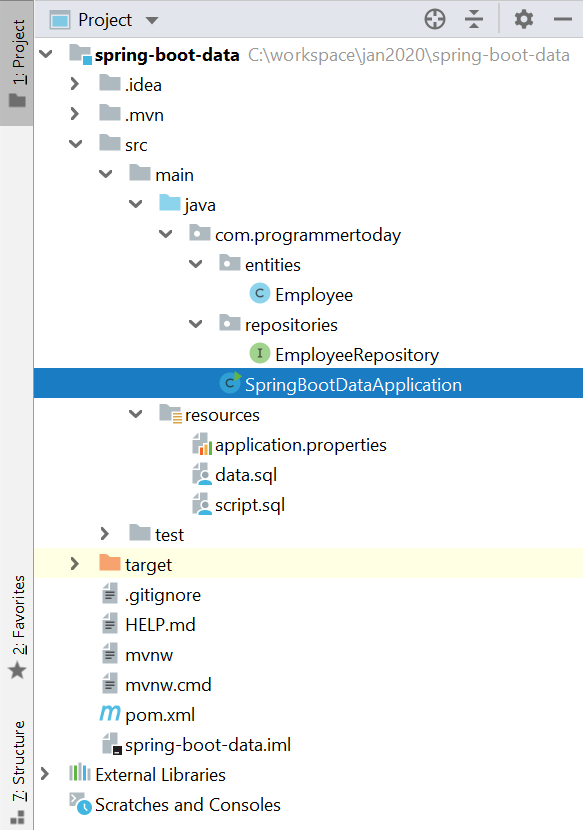
Final Project Structure : Will look like this
1. Add Maven Dependency Or use Spring Initializr
Add the 2 dependencies (spring data jpa and h2 in-memory database) and generate the project if using spring initializr Or you can also add them directly to spring boot pom.
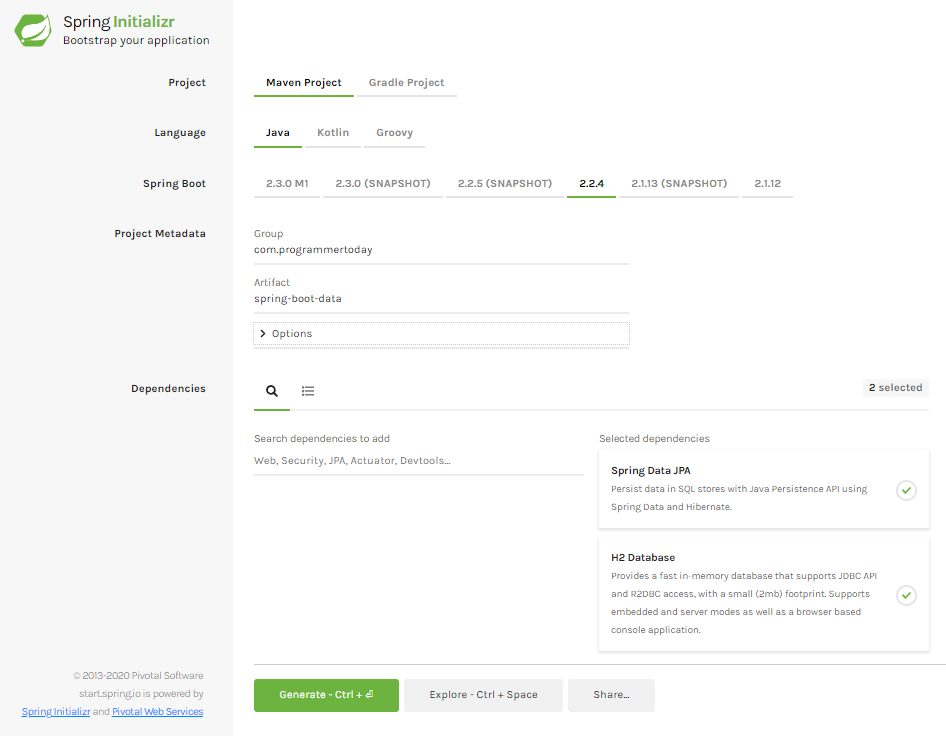
Also add an embedded server like tomcat for the application to run, you must add a Spring Web dependency for adding tomcat in the application Or just type tomcat in spring initializr website.
So the pom.xml file will look like this.
<?xml version="1.0" encoding="UTF-8"?>
<project xmlns="http://maven.apache.org/POM/4.0.0" xmlns:xsi="http://www.w3.org/2001/XMLSchema-instance"
  xsi:schemaLocation="http://maven.apache.org/POM/4.0.0 https://maven.apache.org/xsd/maven-4.0.0.xsd">
  <modelVersion>4.0.0</modelVersion>
  <parent>
     <groupId>org.springframework.boot</groupId>
     <artifactId>spring-boot-starter-parent</artifactId>
     <version>2.2.4.RELEASE</version>
     <relativePath/> <!-- lookup parent from repository -->
  </parent>
  <groupId>com.programmertoday</groupId>
  <artifactId>spring-boot-data</artifactId>
  <version>0.0.1-SNAPSHOT</version>
  <name>spring-boot-data</name>
  <description>Demo project for Spring Boot</description>

  <properties>
     <java.version>1.8</java.version>
  </properties>

  <dependencies>
     <dependency>
        <groupId>org.springframework.boot</groupId>
        <artifactId>spring-boot-starter-data-jpa</artifactId>
     </dependency>
     <dependency>
        <groupId>com.h2database</groupId>
        <artifactId>h2</artifactId>
        <scope>runtime</scope>
     </dependency>
     <dependency>
        <groupId>org.springframework.boot</groupId>
        <artifactId>spring-boot-starter-web</artifactId>
     </dependency>
     <dependency>
        <groupId>org.springframework.boot</groupId>
        <artifactId>spring-boot-starter-test</artifactId>
        <scope>test</scope>
        <exclusions>
           <exclusion>
              <groupId>org.junit.vintage</groupId>
              <artifactId>junit-vintage-engine</artifactId>
           </exclusion>
        </exclusions>
     </dependency>
  </dependencies>

  <build>
     <plugins>
        <plugin>
           <groupId>org.springframework.boot</groupId>
           <artifactId>spring-boot-maven-plugin</artifactId>
        </plugin>
     </plugins>
  </build>

</project>
2. Create : Spring Data Entity
Create an entity called Employee.class
package com.programmertoday.entities;

import javax.persistence.*;
import java.io.Serializable;

@Entity
@Table(name = "Employee")
public class Employee implements Serializable {

   private static final long serialVersionUID = -1798070786993154676L;

   @Id
   private Integer id;

   @Column(name="name")
   private String name;

   @Column(name="address")
   private String address;

   public int getId() {
       return id;
   }

   public void setId(int id) {
       this.id = id;
   }

   public String getName() {
       return name;
   }

   public void setName(String name) {
       this.name = name;
   }

   public String getAddress() {
       return address;
   }

   public void setAddress(String address) {
       this.address = address;
   }

}
3. Spring Data Repository
Create a Spring Data Repository Interface like below and go to the next step.
Here we created a Repository which Spring Data JPA has provided and extend a CrudRepository which provides us some boilerplate code and functionalities which helps us interact with the database just like a normal JPA or Hibernate would do.
package com.programmertoday.repositories;

import com.programmertoday.entities.Employee;
import org.springframework.data.repository.CrudRepository;

public interface EmployeeRepository extends CrudRepository<Employee,Integer> {
}
4. Connection with H2 in-memory database
Just add the below 2 properties for h2 db:
spring.h2.console.enabled=true
spring.h2.console.path=/h2
Also, Just For Testing Create two sample .sql scripts to create an Employee table and insert 2 records into that table on application load or startup.
Create 2 scripts as shown in the snapshot below:

Script.sql
Drop table if exists Employee;
Create table (id number , string name, string address);
Data.sql
insert into Employee (id,name,address) values (1,'John','US');
insert into Employee (id,name,address) values (2,'Mak','UK');
5. Run Main method – @SpringBootApplication
Now just open the main class and run it.
Voila !
Your SpringBoot Spring Data JPA application is up and running @ <localhost:port>
Default port will be 8080 [ example : localhost:8080 ]
When you run the main class of SpringBootApplication, you see the below log in the console which also tells you that the h2 in-memory data base is up and runnning at url “localhost:port/h2”
2020-01-26 21:11:55.948 INFO 22204 — [ main] o.s.b.a.h2.H2ConsoleAutoConfiguration : H2 console available at ‘/h2’. Database available at ‘jdbc:h2:mem:testdb’
Summary
In this tutorial, we learnt about Spring boot capabilities with Spring DATA JPA as a JPA framework. We connected with H2 in-memory database to save/persist data into the database and it’s easy to test.
Hope you liked it !