Here in this tutorial we you will learn to create a java hello world application in docker.
Follow these steps to make a java application run in docker:
1. Create a directory
Create this directory Just to keep all the files in place and organize them.$ mkdir docker-java-app
2. Create a Java file
Create a sample java file inside the above created directory. For example name it as HelloWorld.java
$ cd docker-java-app
class HelloWorld{
  public static void main(String[] args){
    System.out.println("Hello World java app - in Docker");
    }
}
3. Create a Dockerfile
Dockerfile does not contain any file extension so please be careful in this with the name “Dockerfile”.FROM java:8 COPY . /var/www/java WORKDIR /var/www/java RUN javac HelloWorld.java CMD [“java”, “HelloWorld”]
4. Build Docker Image
Please make sure you run the docker build command in the directory where the Dockerfile is present, in our case it is the “docker-java-app” directory where both the files are kept.We can have any name for the image, for example here we named it as “java-hello-app”.$ docker build -t java-hello-appThis command will call the docker daemon to build this image.
5. Run Docker Image
Just a simple command to run the image$ docker run java-hello-appWhich should give the following output:Hello World java app - in Docker
Summary
In this tutorial we learnt how to create a docker based simple java application, we learnt how to build an image and run it on docker using docker command CLI.
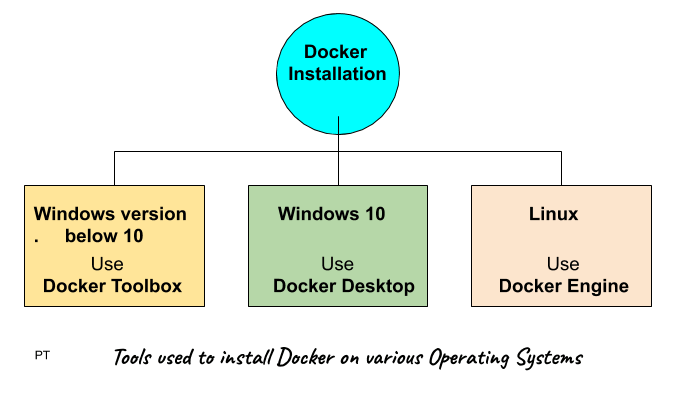
Windows 10 64-bit: Pro, Enterprise, or Education (Build 15063 or later).
Hyper-V and Containers Windows features must be enabled.
The following hardware prerequisites are required to successfully run Client Hyper-V on Windows 10:
64 bit processor
4GB system RAM
BIOS-level hardware virtualization
Installation includes
Docker Engine
Docker CLI
Docker Compose
Docker machine
Kitematic
Installation Steps :
Download the installer from Docker HUB. Docker Desktop Installer.exe (sign up to start the download)
Follow the instructions which comes on the screen.
Click Finish to complete setup and start Docker desktop application
Test successful installation
Open the Docker desktop application
Open a command prompt and type $ docker -v If it returns the version it means docker is installed successfully.
And also test by typing $ docker run hello-world Should return a message “Hello from Docker!”
2. Docker installation on Linux
OS requirement
You will need 64 bit version of linux like Ubuntu.
Installation Steps
Install docker Engine first Update the apt package index: $ sudo apt-get update
Install packages to allow apt to use a repository over HTTPS: $ sudo apt-get install \ apt-transport-https \ ca-certificates \ curl \ gnupg-agent \ software-properties-common
Verify that Docker Engine – Community is installed correctly by running the hello-world image. $ sudo docker run hello-world Which should return a message “Hello from Docker!”
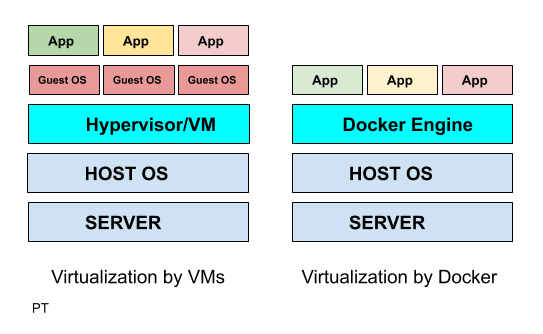
How Traditional Virtual Machines work Vs How Docker Virtualization works.
Traditional Virtualization by VMware/Hyper V
Docker Virtualization
Hypervisor layer – is the one which is used to host VMs
Docker Engine -is the one used to run the OS
Guest OS – Now you would install multiple Operating systems as VMs
Guest OS – is not required in dockers as the docker takes the host OS as its guest os.
Apps – hence you will now install apps on your guest OS
Apps – all the apps you want are run as docker containers.
Advantage over VMs – Does not require additional hardware like RAM for Guest OS as everything runs as docker containers on the Host OS.
Docker Architecture
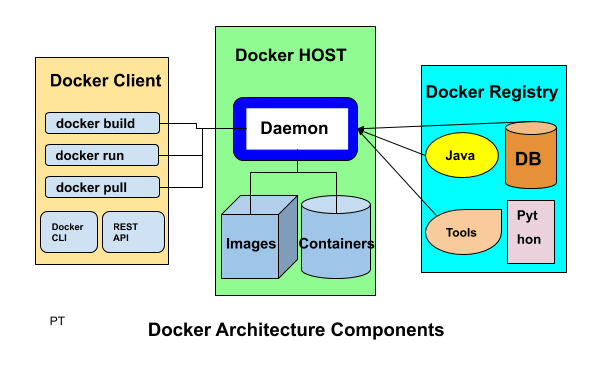
Docker High Level Components
1. Docker Client
Docker client enables user to interact with the docker daemon using docker CLI or REST API to do things like :
Docker build : to create an image
Docker run : to run the installed image
Docker pull : to pull the image from the registry
2. Docker Host
Docker host provides the complete environment to execute and run the applications. It consists of the docker daemon, images and the containers, network and storage.
It pulls the requested image from the docker registry and prepares a container of the image.
It is also used to create a bridge of network among the various docker instances running within the network to communicate with each other.
As storage it has options to mount data volumes, it mounts local directories to store data.
3. Docker Registry
Docker registry is an online repository from where you can download images.
Public docker registries includes the docker HUB, docker CLOUD and private registries can also be used.
Few of the common commands used:
docker pull : to pull image from docker registry
docker push : to publish image to the docker registry
Technology used to make Docker
Docker is written in go language and it takes advantage of several already built in features of Linux kernel to deliver its functionalities.