
Traditional VM Vs Docker Architecture
How Traditional Virtual Machines work Vs How Docker Virtualization works.
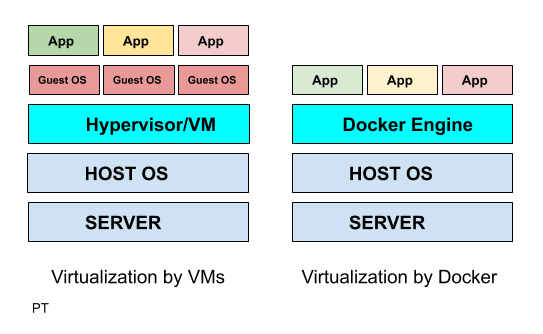
| Traditional Virtualization by VMware/Hyper V | Docker Virtualization |
|---|---|
| Hypervisor layer – is the one which is used to host VMs | Docker Engine -is the one used to run the OS |
| Guest OS – Now you would install multiple Operating systems as VMs | Guest OS – is not required in dockers as the docker takes the host OS as its guest os. |
| Apps – hence you will now install apps on your guest OS | Apps – all the apps you want are run as docker containers. |
| Advantage over VMs – Does not require additional hardware like RAM for Guest OS as everything runs as docker containers on the Host OS. |
Docker Architecture
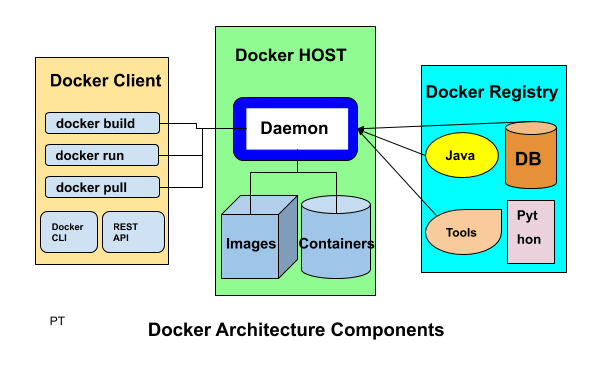
Docker High Level Components
1. Docker Client
Docker client enables user to interact with the docker daemon using docker CLI or REST API to do things like :
Docker build : to create an image
Docker run : to run the installed image
Docker pull : to pull the image from the registry
2. Docker Host
Docker host provides the complete environment to execute and run the applications. It consists of the docker daemon, images and the containers, network and storage.
It pulls the requested image from the docker registry and prepares a container of the image.
It is also used to create a bridge of network among the various docker instances running within the network to communicate with each other.
As storage it has options to mount data volumes, it mounts local directories to store data.
3. Docker Registry
Docker registry is an online repository from where you can download images.
Public docker registries includes the docker HUB, docker CLOUD and private registries can also be used.
Few of the common commands used:
docker pull : to pull image from docker registry
docker push : to publish image to the docker registry
Technology used to make Docker
Docker is written in go language and it takes advantage of several already built in features of Linux kernel to deliver its functionalities.