Apache Kafka Configuration| Kafka Settings

We will go through Apache Kafka Configuration settings which you need to do as part of setting up Apache Kafka.

Four Kafka Component Settings

  • Broker Settings
  • Producer Settings
  • Consumer Settings
  • Zookeeper Configuration with Kafka

Apache Kafka Configuration

1. Broker Settings

The Overall Performance of Kafka depends on the following Sub-settings.

1. Connection Settings

Zooker session timeout default value is 30000 ms(milliseconds).

zookeeper.session.timeout.ms

Within this time the server sends Zookeeper heartbeat signals, if it fails to do so the server is considered to be dead.
Do not set this value too low, otherwise it will falsely consider a server dead, also do not set this value too high, otherwise zookeeper will take too long to determine a truly dead server.

2. Topic Settings

For each topic, Kafka maintains a structured commit log with one or more partitions. In general, the more the partitions in a Kafka cluster, more parallel consumers can be added, resulting in higher throughput.

Important Topic Properties

auto.create.topics.enable

With this property set to true nonexistent topics get created automatically with a default replication factor

default.replication.factor

For high availability production systems, you should set this value to at least 3.

num.partitions

For automatically created topics it’s default value is 1. You can change based on requirements.

delete.topic.enable

This allows users to delete a topic from Kafka using the admin tool, if this property is turned off then Deleting a topic through the admin tool will have no effect.
By default this feature is turned off (set to false).

3. Log Settings

log.roll.hours

The maximum time, in hours, before a new log segment is rolled out. The default value is 168 hours (seven days).

This setting controls the period of time after which Kafka will force the log to roll, even if the segment file is not full. This ensures that the retention process is able to delete or compact old data.

log.retention.hours

The number of hours to keep a log file before deleting it. The default value is 168 hours (seven days).

log.dirs

A comma-separated list of directories in which log data is kept. If you have multiple disks, list all directories under each disk.

log.retention.bytes

The amount of data to retain in the log for each topic partition. By default, log size is unlimited.

If log.retention.hours and log.retention.bytes are both set, Kafka deletes a segment when either limit is exceeded.

log.segment.bytes

The log for a topic partition is stored as a directory of segment files. This setting controls the maximum size of a segment file before a new segment is rolled over in the log. The default is 1 GB.

Log Flush Management

log.flush.interval.messages

Specifies the number of messages to accumulate on a log partition before Kafka forces a flush of data to disk.

log.flush.scheduler.interval.ms 

Specifies the amount of time (in milliseconds) after which Kafka checks to see if a log needs to be flushed to disk.

log.segment.bytes

Specifies the size of the log file. Kafka flushes the log file to disk whenever a log file reaches its maximum size.

log.roll.hours 

Specifies the maximum length of time before a new log segment is rolled out (in hours); this value is secondary to log.roll.ms. Kafka flushes the log file to disk whenever a log file reaches this time limit.

4. Compacting Settings

log.cleaner.dedupe.buffer.size

Specifies total memory used for log de-duplication across all cleaner threads.

By default, 128 MB of buffer is allocated.

log.cleaner.io.buffer.size

Specifies the total memory used for log cleaner I/O buffers across all cleaner threads. By default, 512 KB of buffer is allocated.

5. General Broker Settings

auto.leader.rebalance.enable

Enables automatic leader balancing, default is enabled.

unclean.leader.election.enable

This property allows you to specify a preference of availability or durability. This is an important setting: If availability is more important than avoiding data loss, ensure that this property is set to true. If preventing data loss is more important than availability, set this property to false.

This property is set to true by default, which favors availability.

controlled.shutdown.enable

Enables controlled shutdown of the server. The default is enabled.

min.insync.replicas

When a producer sets acks to “all”, min.insync.replicas specifies the minimum number of replicas that must acknowledge a write for the write to be considered successful. If this minimum cannot be met, then the producer will raise an exception.

You should set min.insync.replicas to 2 for replication factor equal to 3.

message.max.bytes

Specifies the maximum size of message that the server can receive.

broker.rack

The rack awareness feature distributes replicas of a partition across different racks.

2. Producer Settings

The lifecycle of a request from producer to broker involves several configuration settings:

The producer polls for a batch of messages from the batch queue, one batch per partition. A batch is ready when one of the following is true:a. batch.size is reached. Note: Larger batches typically have better compression ratios and higher throughput, but they have higher latency.

a. batch.size is reached. Note: Larger batches typically have better compression ratios and higher throughput, but they have higher latency.

b. linger.ms (time-based batching threshold) is reached. Note: There is no simple guideline for setting linger.ms values; you should test settings on specific use cases. For small events (100 bytes or less), this setting does not appear to have much impact.

c. Another batch to the same broker is ready.

d. The producer calls flush() or close().

Some additional settings

max.in.flight.requests.per.connection (pipelining)
compression.type

It accepts standard compression codecs (‘gzip’, ‘snappy’, ‘lz4’), as well as ‘uncompressed’ (the default, equivalent to no compression).

acks

The acks setting specifies acknowledgments that the producer requires the leader to receive before considering a request complete. This setting defines the durability level for the producer.
if Acks = 0; it means High Throughput , Low latency
if Acks = 1; it means medium Throughput , medium latency
if Acks = -1; it means low Throughput , High latency

flush() : which makes all buffered records immediately available to send (even if linger.ms is greater than 0).

3. Consumer Settings

One basic guideline for consumer performance is to keep the number of consumer threads equal to the partition count.

4. Zookeeper Configuration with Kafka

Some recommendations :

  • Do not run ZooKeeper on a server where Kafka is running.
  • Make sure you allocate sufficient JVM memory. A good starting point is 4GB.
  • To monitor the ZooKeeper instance, use JMX metrics.
  • When using ZooKeeper with Kafka you should dedicate ZooKeeper to Kafka, and not use ZooKeeper for any other components.

Summary

In this article we saw some configuration settings of Kafka components for it to run with high performance, we saw some recommended settings and what each setting means.
I Hope you liked the article !


Apache Kafka – Example of Producer Consumer Code with Java

A simple Kafka project structure

kafka-project-structure-in-eclipse

5 Easy steps !

1. Add the dependency in pom.xml if its a maven project.

        
<!-- https://mvnrepository.com/artifact/org.apache.kafka/kafka-clients -->
<dependency>
  <groupId>org.apache.kafka</groupId>
  <artifactId>kafka-clients</artifactId>
  <version>2.3.0</version>
</dependency>
    

2. At first let’s declare an interface having Kafka configuration parameters as Constants.

        
package com.programmertoday.kafka;

public interface KafkaConstants {

  public static String KAFKA_BROKERS = "localhost:9092";
  public static Integer MESSAGE_COUNT = 10;
  public static String CLIENT_ID = "client_1";
  public static String TOPIC_NAME = "demotopic";
  public static String GROUP_ID_CONFIG = "consumerGroup_1";
  public static Integer MAX_NO_MESSAGE_FOUND_COUNT = 10;
  public static String OFFSET_RESET_LATEST = "latest";
  public static String OFFSET_RESET_EARLIER = "earliest";
  public static Integer MAX_POLL_RECORDS = 1;

}
    

3. Create a producer class – let’s call it “KafkaProducerClass”

        
package com.programmertoday.kafka;

import java.util.Properties;

import org.apache.kafka.clients.producer.KafkaProducer;
import org.apache.kafka.clients.producer.Producer;
import org.apache.kafka.clients.producer.ProducerConfig;
import org.apache.kafka.common.serialization.LongSerializer;
import org.apache.kafka.common.serialization.StringSerializer;

public class KafkaProducerClass {

	public static Producer<Long, String> createProducer() {
        Properties props = new Properties();
        props.put(ProducerConfig.BOOTSTRAP_SERVERS_CONFIG, KafkaConstants.KAFKA_BROKERS);
        props.put(ProducerConfig.CLIENT_ID_CONFIG, KafkaConstants.CLIENT_ID);
        props.put(ProducerConfig.KEY_SERIALIZER_CLASS_CONFIG, LongSerializer.class.getName());
        props.put(ProducerConfig.VALUE_SERIALIZER_CLASS_CONFIG, StringSerializer.class.getName());
        //props.put(ProducerConfig.PARTITIONER_CLASS_CONFIG, CustomPartitioner.class.getName()); // for custom partitions
        return new KafkaProducer<>(props);
    }
}
        

4. Create a consumer class – let’s call it “KafkaConsumerClass”

        
package com.programmertoday.kafka;

import java.util.Collections;
import java.util.Properties;

import org.apache.kafka.clients.consumer.Consumer;
import org.apache.kafka.clients.consumer.ConsumerConfig;
import org.apache.kafka.clients.consumer.KafkaConsumer;
import org.apache.kafka.common.serialization.LongDeserializer;
import org.apache.kafka.common.serialization.StringDeserializer;

public class KafkaConsumerClass {

    public static Consumer<Long, String> createConsumer() {
          Properties props = new Properties();
          props.put(ConsumerConfig.BOOTSTRAP_SERVERS_CONFIG, KafkaConstants.KAFKA_BROKERS);
          props.put(ConsumerConfig.GROUP_ID_CONFIG, KafkaConstants.GROUP_ID_CONFIG);
          props.put(ConsumerConfig.KEY_DESERIALIZER_CLASS_CONFIG, LongDeserializer.class.getName());
          props.put(ConsumerConfig.VALUE_DESERIALIZER_CLASS_CONFIG, StringDeserializer.class.getName());
          props.put(ConsumerConfig.MAX_POLL_RECORDS_CONFIG, KafkaConstants.MAX_POLL_RECORDS);
          props.put(ConsumerConfig.ENABLE_AUTO_COMMIT_CONFIG, "false");
          props.put(ConsumerConfig.AUTO_OFFSET_RESET_CONFIG, KafkaConstants.OFFSET_RESET_EARLIER);
          Consumer<Long, String> consumer = new KafkaConsumer<>(props);
          consumer.subscribe(Collections.singletonList(KafkaConstants.TOPIC_NAME));
          return consumer;
      } 
}
    

5. Create a Kafka test client – with main method in it and we poll the records.

        
package com.programmertoday.kafka;

import java.util.concurrent.ExecutionException;

import org.apache.kafka.clients.consumer.Consumer;
import org.apache.kafka.clients.consumer.ConsumerRecords;
import org.apache.kafka.clients.producer.Producer;
import org.apache.kafka.clients.producer.ProducerRecord;
import org.apache.kafka.clients.producer.RecordMetadata;

public class KafkaClient {

  public static void main(String[] args) {

    System.out.println("Kakfa Test in progress...........");
    executeProducer(); // if running producer, please commit the below line.
    //executeConsumer(); // if running consumer, please comment to above line.
  }

  static void executeConsumer() {
    Consumer<Long, String> consumer = KafkaConsumerClass.createConsumer();
    int noMessageFound = 0;
    while (true) { // condition set to true so that it keeps on running
      ConsumerRecords<Long, String> consumerRecords = consumer.poll(1000);
      // 1000 is the time in milliseconds consumer will wait if no record is found at
      // broker.
      if (consumerRecords.count() == 0) {
        noMessageFound++;
        if (noMessageFound > KafkaConstants.MAX_NO_MESSAGE_FOUND_COUNT)
          // If no message found count is reached to threshold exit loop.
          break;
        else
          continue;
      }
      // to print each record.
      consumerRecords.forEach(record -> {
        System.out.println("Record Key " + record.key());
        System.out.println("Record value " + record.value());
        System.out.println("Record partition " + record.partition());
        System.out.println("Record offset " + record.offset());
      });
      // commits the offset of record to broker.
      consumer.commitAsync();
    }
    consumer.close(); // to close the consumer
  }

  static void executeProducer() {
    Producer<Long, String> producer = KafkaProducerClass.createProducer();
    for (int index = 0; index < KafkaConstants.MESSAGE_COUNT; index++) {
      ProducerRecord<Long, String> record = new ProducerRecord<Long, String>(KafkaConstants.TOPIC_NAME,
          "This is a kafka record " + index);
      try {
        RecordMetadata metadata = producer.send(record).get();
        System.out.println("Record sent with key " + index + " to partition " + metadata.partition()
            + " with offset " + metadata.offset());
      } catch (ExecutionException e) {
        System.out.println("Error in sending record");
        System.out.println(e);
      } catch (InterruptedException e) {
        System.out.println("Error in sending record");
        System.out.println(e);
      }
    }
  }

}
    

Summary

Now you know how to create kafka producer, kafka consumer in java, we hope you enjoyed learning this.


Apache Kafka Installation – CLI

Follow These Very Simple Steps to install and start Kafka

Prerequisite: Download and install jre

Step 1 : Download Kafka from official website( https://kafka.apache.org/downloads )

Step 2 : Edit the two configuration files

  • Server.properties
  • Zookeeper.properties

Step 3 : Start Zookeeper and then start Kafka

To Test :

Step 4 : Create a topic, produce message on kafka topic, consume kafka topic

Let’s Begin !

1. Download kafka zip from the official website and then unzip it, you will see a folder structure like this.

unzip-kafka-folder-structure

2. Edit two config property files

Change from :
log.dirs=/tmp/kafka-logs
to
log.dirs=E:/kafka/kafka-logs

kafka-server-properties

Change from :
dataDir=/tmp/zookeeper
To
dataDir=E:/kafka/zookeeper

kafka-zookeeper-properties

3. Start zookeeper and then start kafkaStart zookeeper server

Goto > Kafka directory & run zookeeper

E:\softwares\kafka_2.12-2.3.0>.\bin\windows\zookeeper-server-start.bat .\config\zookeeper.properties

start-zookeeper-command-line

Start kafka server

E:\softwares\kafka_2.12-2.3.0>.\bin\windows\kafka-server-start.bat .\config\server.properties

start-kafka-server

You will see the message below if the start is successful : [2019-08-25 11:46:05,913] INFO [KafkaServer id=0] started (kafka.server.KafkaServer)

You will see the log directories and log files got created in the logs path given earlier in properties files.

logs-kafka-zookeeper

4. Create Topic > produce message on topic > consume message from topic

Example Topic name : “demotopic”Create topic

E:\softwares\kafka_2.12-2.3.0>.\bin\windows\kafka-topics.bat --create --zookeeper localhost:2181 --replication-factor 1 --partitions 1 --topic demotopic

create-kafka-topic-command-line

This is to create a topic

List Kafka topics

E:\softwares\kafka_2.12-2.3.0>.\bin\windows\kafka-topics.bat --list --zooke eper localhost:2181

list-kafka-topics-command-line

List all kafka topicsProduce message on “demotopic”

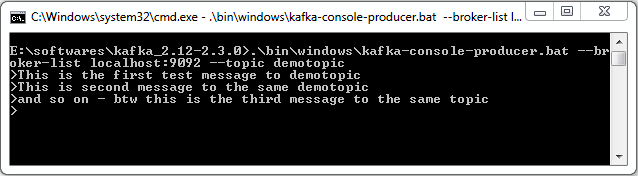
E:\softwares\kafka_2.12-2.3.0>.\bin\windows\kafka-console-producer.bat --br oker-list localhost:9092 --topic demotopic

kafka procuder message to a topic

This produced message on a topic

Consume message from “demotopic”

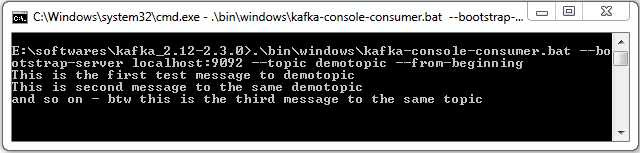
E:\softwares\kafka_2.12-2.3.0>.\bin\windows\kafka-console-consumer.bat --bo otstrap-server localhost:9092 --topic demotopic --from-beginning

kafka procuder message to a topic

This is to consume a topic

Delete a topic – demotopic

E:\softwares\kafka_2.12-2.3.0>.\bin\windows\kafka-topics.bat --zookeeper lo calhost:2181 --delete --topic demotopic

delete-a-topic-in-kafka-via-command-line
Topic gets marked for deletion.

Summary

Now you know how to install kafka zookeeper on your windows system and also you have learnt how to create topic , list topic, produce message and consume message from a topic and last but not least delete a topic.

Read next article to know how to create Producer Consumer code in JAVA.


Apache Kafka Architecture and Components

Cluster Architecture of Apache Kafka

Kafka-architecture-broker-zookeeper-consumer-producer-min

Apache Kafka Main Components

Cluster

It is a group of computers , each executing same instance of kafka broker.

Broker

It is just a meaningful name given to the kafka server, kafka producer does not directly interact with the consumer, they use kafka broker as the agent or broker to interact. In a cluster there can be more than one brokers.

Brokers are stateless, hence to maintain the cluster state they use ZooKeeper.

Zookeeper

ZooKeeper is used for managing and coordinating Kafka broker. ZooKeeper service is mainly used to notify producer and consumer about the presence of any new broker in the Kafka cluster system or failure of the broker in the Kafka cluster system. As per the notification received by the Zookeeper regarding presence or failure of the broker then producer and consumer takes decision and starts coordinating their task with some other broker.

Producers

Producer is a component which pushes data to the brokers, it doesn’t wait for acknowledgement from the brokers rather sends data as fast as the brokers can handle. There can be more than one producers depending on the use case.

Consumers

Since Kafka brokers are stateless, which means that the consumer has to maintain how many messages have been consumed by using partition offset. If the consumer acknowledges a particular message offset, it implies that the consumer has consumed all prior messages. The consumer issues an asynchronous pull request to the broker to have a buffer of bytes ready to consume. The consumers can kind of rewind or skip to any point in a partition simply by supplying an offset value. Consumer offset value is notified by ZooKeeper.

Kafka-topic-partitions-min

Kafka topic

A kafka topic is a logical channel to which producers publish messages and from which the consumers receive messages.

A topic name must be unique so that it is identifiable by both producer and consumer, there can be any number of topics, we cannot modify the data once published.

A Topic may contain any number of partitions as shown in the picture above.

Partitions in kafka

As you know broker store data of a topic, this data can be huge, break the data into two or more parts and distribute it to multiple computers.

In a Kafka cluster, Topics are split into Partitions and also replicated across brokers.

One can also add a key to the message to get ensured that all the messages with this key will end up in the same partition if the message is produced with the key. Because of this kafka also offers message sequence guarantee.

Otherwise without a key data is written to partitions randomly.

Offset

It is the sequence id given to a message in a partition, an offset is local to a partition, There can be any number of partitions, with no limitations to it.

— partition 1

— partition 2

Each partition sits on a single machine.

Note: How to directly locate a message ?

You need to know 3 things:

  • Topic name
  • Partition number
  • Offset

Topic replication factor

It is always a good design decision to have a replication factor of a topic. It helps when a broker goes down the replica will still have the topic data. For example if the replication factor is 2 then a broker will have atleast one additional copy other than the primary.

Replication takes places at partition level only.

There has to be a leader among Brokers for a given partition and that will be only one. The number of replication factor cannot be greater than the number of available brokers.

Kafka-topic-replication-factor-min

Consumer Group

Scenario : when hundreds of producers produce data to a single consumer, it’s hard to manage its volume and velocity.

Partitioning and consumer group is a tool for scalability, Maximum number of consumers in a group is equal to the total number of partitions you have on the topic.

Kafka doesn’t allow more than 2 consumers to read data from the same partition.

Also one consumer group will have one unique group id.

Summary

We learn about Kakfa features, its uses, usecases and core apis, Hope you liked it !