Follow These Very Simple Steps to install and start Kafka
Prerequisite: Download and install jre
Step 1 : Download Kafka from official website( https://kafka.apache.org/downloads )
Step 2 : Edit the two configuration files
- Server.properties
- Zookeeper.properties
Step 3 : Start Zookeeper and then start Kafka
To Test :
Step 4 : Create a topic, produce message on kafka topic, consume kafka topic
Let’s Begin !
1. Download kafka zip from the official website and then unzip it, you will see a folder structure like this.

2. Edit two config property files
Change from :
log.dirs=/tmp/kafka-logs
to
log.dirs=E:/kafka/kafka-logs

Change from :
dataDir=/tmp/zookeeper
To
dataDir=E:/kafka/zookeeper

3. Start zookeeper and then start kafkaStart zookeeper server
Goto > Kafka directory & run zookeeper
E:\softwares\kafka_2.12-2.3.0>.\bin\windows\zookeeper-server-start.bat .\config\zookeeper.properties

Start kafka server
E:\softwares\kafka_2.12-2.3.0>.\bin\windows\kafka-server-start.bat .\config\server.properties

You will see the message below if the start is successful : [2019-08-25 11:46:05,913] INFO [KafkaServer id=0] started (kafka.server.KafkaServer)
You will see the log directories and log files got created in the logs path given earlier in properties files.

4. Create Topic > produce message on topic > consume message from topic
Example Topic name : “demotopic”Create topic
E:\softwares\kafka_2.12-2.3.0>.\bin\windows\kafka-topics.bat --create --zookeeper localhost:2181 --replication-factor 1 --partitions 1 --topic demotopic

This is to create a topic
List Kafka topics
E:\softwares\kafka_2.12-2.3.0>.\bin\windows\kafka-topics.bat --list --zooke eper localhost:2181

List all kafka topicsProduce message on “demotopic”
E:\softwares\kafka_2.12-2.3.0>.\bin\windows\kafka-console-producer.bat --br oker-list localhost:9092 --topic demotopic
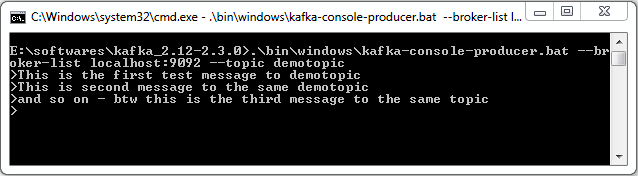
This produced message on a topic
Consume message from “demotopic”
E:\softwares\kafka_2.12-2.3.0>.\bin\windows\kafka-console-consumer.bat --bo otstrap-server localhost:9092 --topic demotopic --from-beginning
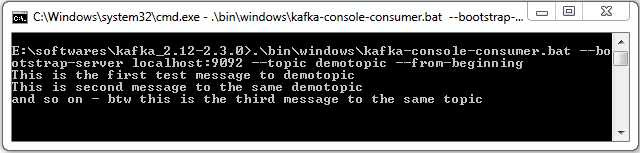
This is to consume a topic
Delete a topic – demotopic
E:\softwares\kafka_2.12-2.3.0>.\bin\windows\kafka-topics.bat --zookeeper lo calhost:2181 --delete --topic demotopic

Summary
Now you know how to install kafka zookeeper on your windows system and also you have learnt how to create topic , list topic, produce message and consume message from a topic and last but not least delete a topic.
Read next article to know how to create Producer Consumer code in JAVA.