Java – HashSet Class

The Hashset class implements the Set interface. The underlying data structure for hashset is the hashtable The insertion order is not maintained in Set, Objects are inserted based on hashcodes. It allows to store null elements.

Hierarchy of HashSet class

public class HashSet<E> extends AbstractSet<E> 
                        implements Set<E>, Cloneable, Serializable
{ //implementation }

The HashSet class extends AbstractSet class which implements Set interface. The Set interface inherits Collection and Iterable interfaces in hierarchical order.
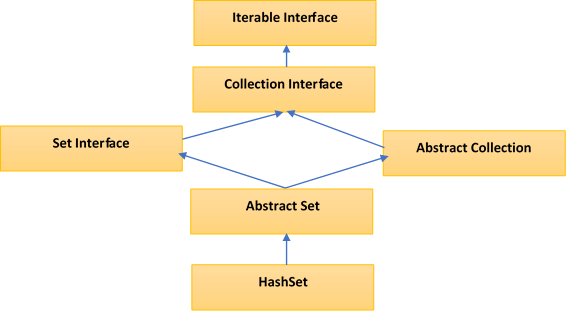
HashSet Class Hierarchy

HashSet Constructors

  1. HashSet hs = new HashSet();
    Default initial capacity is 16 and default load factor is 0.75.
  2. HashSet hs = new HashSet(int initialCapacity);
    initializes a HashSet with a specified capacity.
  3. HashSet hs = new HashSet(int initialCapacity, float loadFactor);
    initializes a HashSet with a specified capacity and load factor (0.75)
  4. HashSet hs = new HashSet(Collection C);
    It is used to initialize HashSet with the elements of Collection(Eg: an arraylist)
Initial Capacity

Initial Capacity means the number of buckets in the HashSet(internally backing HashMap) when it is created and ofcourse the number of buckets will increase automatically if the current size gets full.

By Default : the initial capacity is 16, we can override this by passing the capacity in one of its Constructors like this : HashSet(int initialCapacity).

Load Factor

The load factor is a measure of how full the HashSet is allowed to get before its capacity is automatically increased and the Default load factor is 0.75.

There is a threshold before the backing hashtable gets rehashed. So when the number of entries in the hash table exceeds the threshold (which is the product of the load factor and the current capacity), then the hash table is rehashed (which means, internal data structures are rebuilt) so that the hash table has approximately twice the number of buckets.

By Default : In the HashSet, the internal capacity is 16 and load factor is 0.75. The number of buckets will automatically get increased when the table has 12 elements(16 X 0.75) in it.

Internal working of a HashSet

All the classes of Set interface internally backed up by Map. HashSet uses HashMap for storing its object internally. You must be wondering that to enter a value in HashMap we need a key-value pair, but in HashSet we are passing only one value.

Storage in HashMap

Actually the value we insert in HashSet acts as key to the map Object and for its value java uses a constant variable. So in key-value pair all the keys will have same value

If we look at add() method of HashSet class:

public boolean add(E e)
{
   return map.put(e, PRESENT) == null;
}
/* Where PRESENT is a Dummy value to associate with an Object in Map
   private static final Object PRESENT = new Object(); */

Methods in HashSet Class

S.NoMethodDescription
1boolean add​(E e)This method Adds the specified element to the set if it is not already present. Important : This method internally uses equals() method, so it the element is duplicate it is not added to the set.
2boolean contains​(Object o)Returns true if this set contains the specified element else returns false
3boolean isEmpty()Returns true if this set contains no elements.
4boolean remove​(Object o)Removes the specified element from this set if it is present.
5void clear()Removes all of the elements from this set.
6Object clone()Returns a shallow copy of this HashSet instance: the elements themselves are not cloned.
7Iterator iterator()Returns an iterator over the elements in this set.
8int size()Returns the number of elements in this set (its cardinality).
9Spliterator spliterator()Creates a late-binding and fail-fast Spliterator over the elements in this set.

Coding Examples

1. Add, remove and iterate over HashSet
  //1.Create HashSet
  HashSet<String> hs = new HashSet<>();
   
  //2.Add elements to HashSet
  hs.add("Apple");
  hs.add("Ball");
  hs.add("Cat");
  hs.add("Dog");
  hs.add("Elephant");
   
  System.out.println("HashSet : "+hs);
   
  //3.Check if element exists
  boolean found = hs.contains("Apple");  //true
  System.out.println("Found : "+found);
   
  //4.Remove an element
  hs.remove("Dog");
   
  //5.Iterate over values
  Iterator<String> itr = hs.iterator();
  System.out.println("HashSet After removal of Dog -") 
  while(itr.hasNext())
  {
      String value = itr.next(); 
      System.out.println("Value: " + value);
  }
  

Output

    HashSet : [Apple, Ball, Cat, Dog, Elephant]
    Found : true
    HashSet After removal of Dog - 
    Value: Apple
    Value: Ball
    Value: Cat
    Value: Elephant
2. Create HashSet from another Collection
  public static void main(String args[]){  
  ArrayList<String> list=new ArrayList<String>();  
      list.add("Apple");  
      list.add("Ball");  
        
      HashSet<String> hs=new HashSet(list);  
      hs.add("Cat");  
      Iterator<String> i=hs.iterator();  
      while(i.hasNext())  
      {  
      System.out.println(i.next());  
      }  
  } 
    

Output

    Apple
    Ball
    Cat
3. Convert HashSet to ArrayList using java 8 Stream Apis
    HashSet<String> hs = new HashSet<>();
      hs.add("Apple");
      hs.add("Ball");
      hs.add("Cat");
        
      List<String> arrayList = hs.stream().collect(Collectors.toList());
        
      System.out.println(arrayList);
    

Output

      [Apple, Ball, Cat] 

When to use HashSet ?

Yes developers may also use ArrayList for storing elements, But in Scenarios where you want to have distinct elements with no duplicates, use of HashSet will be very useful.

Difference between HashSet and TreeSet

S.NoHashSetTreeSet
1For operations like search, insert and delete. It takes constant time for these operations on average. HashSet is faster than TreeSet. HashSet is Implemented using a hash tableTreeSet takes O(Log n) for search, insert and delete which is higher than HashSet. But TreeSet keeps sorted data. TreeSet is implemented using a Self Balancing Binary Search Tree (Red-Black Tree). TreeSet is backed by TreeMap in Java.
2Elements in HashSet are not ordered.maintains objects in Sorted order defined by either Comparable or Comparator method in Java. TreeSet elements are sorted in ascending order by default.
3HashSet allows null objectTreeSet doesn’t allow null Object and throw NullPointerException, Why, because TreeSet uses compareTo() method to compare keys and compareTo() will throw java.lang.NullPointerException.
4HashSet uses equals() method to compare two object in Set and for detecting duplicates.TreeSet uses compareTo() method for same purpose. If equals() and compareTo() are not consistent, i.e. for two equal object equals should return true while compareTo() should return zero, than it will break contract of Set interface and will allow duplicates in Set implementations like TreeSet

Linkedlist – Internal implementation

Internally linkedlist has a private static class called Node, which is used to add the elements, since linkedlist class is implemented as a doubly linkedlist so each node stores the reference of previous node as well along with the next node.

            
private static class Node<E> {
    E item;
    Node<E> next;
    Node<E> prev;
  
    Node(Node<E> prev, E element, Node<E> next) {
        this.item = element;
        this.next = next;
        this.prev = prev;
    }
  }
  

How do you add an element in a Linkedlist ?

Answer : using add() method

Internally : What happens when you call add() method ?

In a linked list when you call its add() method to add an element to the list, it internally calls the linklast() method.

public boolean add(E e) {
  linkLast(e);
  return true;
}

Also there are two transient variables called the first and last which are there to hold the reference of first and last nodes of the linkedlist.

      
/**
* Pointer to first node.
*/
transient Node<E> first;
  
/**
* Pointer to last node.
*/
transient Node<E> last;

In this method a new node is created to store the new element and the variable last starts referring to this node. Also there is a condition check if this was the very first node which is being added, if that is the case then the variable first also start pointing to this new node along with the variable last.

      
/**
* Links e as last element.
*/
  void linkLast(E e) {
      final Node<E> l = last;
      final Node<E> newNode = new Node<>(l, e, null);
      last = newNode;
      if (l == null)
          first = newNode;
      else
          l.next = newNode;
      size++;
      modCount++;
  }

Other than add() method there are other methods as well to add elements in the linkedlist.

Another one is the addFirst() method

Internally : What happens when you call addFirst() method ?

This method internally calls linkFirst() method.

In this method a new node is created to store the added element and the variable first starts referring to this node (as this new node becomes the first node). There is also a check to see if it is the very first insertion in that case this node is the last node too. If it is not the first node then the previous “first” node now comes at the second position so its prev reference has to refer to the new node.

logical ! isn’t it ?  see the code below.

 
 /**
 * Links e as first element.
 */
  private void linkFirst(E e) {
      final Node<E> f = first;
      final Node<E> newNode = new Node<>(null, e, f);
      first = newNode;
      if (f == null)
          last = newNode;
      else
          f.prev = newNode;
      size++;
      modCount++;
  }
 

There is also an add() method to add element at a specific index. If that method is called then the already existing element at the passed index has to be shifted right.

Want to add element at particular index ?

Answer : Use add() with index as argument

Internally : What happens when you call add(int index, E element) method ?/p>

It checks for the index position, then checks if the index if last , in that case it calls linkLast() method otherwise it calls linkBefore() method which shifts already existing element to the right.

 
public void add(int index, E element) {
  checkPositionIndex(index);

  if (index == size)
      linkLast(element);
  else
      linkBefore(element, node(index));
}
 

How do you remove element from a LinkedList ?


Answer : Using remove() method

Internally : What happens when you call remove() method ?

There are few types :

  • remove() : without any index then it removes the first occurrence of the specified element from this list as this method internally calls removeFirst() method which internally calls unlinkFirst(Node(E) f) method where it nullifies item value and its next reference.
  • remove(int index) : Removes the element at the specified position in this list. Shifts any subsequent elements to the left (subtracts one from their indices). Returns the element that was removed from the list.
  • removeFirst() : is used to remove and return the first element of the list.
  • removeLast() : is used to remove and return the last element of the list.
public E remove(int index) {
   checkElementIndex(index);
   return unlink(node(index));
}
    
**
* Unlinks non-null node x.
*/
E unlink(Node<E> x) {
   // assert x != null;
   final E element = x.item;
   final Node<E> next = x.next;
   final Node<E> prev = x.prev;

   if (prev == null) {
       first = next;
   } else {
       prev.next = next;
       x.prev = null;
   }

   if (next == null) {
       last = prev;
   } else {
       next.prev = prev;
       x.next = null;
   }

   x.item = null;
   size--;
   modCount++;
   return element;
}

How do you fetch/get element from a LinkedList ?


Answer : Using get() method

Internally : What happens when you call get() method ?

An index is to be passed to get() method to fetch an element from the linkedlist.

public E get(int index) {
  //checkElementIndex() is of type void, it checks for IndexOutOfBoundsException, 
  //based on condition (index>=0 && index<size)
  checkElementIndex(index); 
  return node(index).item;
}

getFirst() and getLast() : fetches the respective first and last elements.

Summary

I hope this article helped you in understanding the internal implementation of the linked list. You can try creating your own.


Java – HashMap Internal implementation

I assume you are already aware of the basic usage of put(i.e to insert an element) and get(to fetch an element) methods of the HashMap, to understand HashMap’s internal implementation we will have a deeper look into these methods, meaning – how key-value pairs are stored and how value is fetched by key.

Do you know how HashMap works ?


If someone asks you or want’s to understand how does it work ?

Answer to this question will be very straight forward – On the principle of Hashing,
Where hashing function in involved in mapping Objects when putting the elements and also when getting the elements.

What do you mean by Hashing ?


Hashing is an important Data Structure which is designed to use a special function called the Hash function which is used to map a given value with a particular key for faster access of elements. In Java terms converting an Object into its integer form using hashcode() method. The hash function should return the same code each and every time the function is applied to the same object which means that two equal objects must produce the same hash code.

Whenever you insert new key-value pair using put() method, HashMap blindly doesn’t allocate index in the table[] array. Instead it calls hash function on the key. HashMap has its own hash function to calculate the hash code of the key. This function is implemented so that it overcomes default poorly implemented hashCode() methods. Below is implementation code of hash().

final int hash(Object k) {
  int h = 0;
  if (useAltHashing) {
  if (k instanceof String) {
return sun.misc.Hashing.stringHash32((String) k);
      }
      h = hashSeed;
  }
  h ^= k.hashCode();

// This function ensures that hashCodes that differ only by
// constant multiples at each bit position have a bounded
// number of collisions (approximately 8 at default load //factor).
    h ^= (h >>> 20) ^ (h >>> 12);
    return h ^ (h >>> 7) ^ (h >>> 4);
}

After calculating the hash code of the key, it calls indexFor() method by passing the hash code of the key and length of the table[] array. This method returns the index in the table[] array for that particular key-value pair.

/* Returns index for hash code h. */
static int indexFor(int h, int length) {
    return h & (length-1);
}

Buckets

A bucket is one element of HashMap array. It is used to store nodes. Two or more nodes can have the same bucket. In that case link list structure is used to connect the nodes. Buckets are different in capacity. A relation between bucket and capacity is as follows:

capacity = number of buckets * load factor

A single bucket can have more than one nodes, it depends on hashCode() method. The better your hashCode() method is, the better your buckets will be utilized.

Entry class in HashMap

So what is the use of Entry[] in a HashMap ? The HashMap stores the Objects as Entry instances, not as key and value.

Hmm.. So why is it so important that one should know about it ?

HashMap has an inner class called an Entry Class which holds the key and values. There is also something called next, which you will get to know a bit later.

static class Entry<K,V> implements Map.Entry<K,V>
{
    final K key;
    V value;
    Entry<K,V> next;
    final int hash;
    ........
}

You know that the HashMap stores the Entry instances in an array and not directly as key-value pairs. In order to store a value, it uses a method – put() of the HashMap. Let’s go and see how it works.

How HashMap.put() method works internally

When we call put method, hashcode() method of the key object class is called so that hash function of the map can find a bucket location to store value object, which is actually an index of the internal array, known as the table.

HashMap internally stores mapping in the form of Map.Entry object which contains both key and value object.

Since the internal array of HashMap is of fixed size, and if you keep storing objects, at some point of time hash function will return same bucket location for two different keys, this is called collision in HashMap. In this case, a linked list is formed at that bucket location and a new entry is stored as next node

If we try to retrieve an object from this linked list, we need an extra check to search correct value, this is done by equals() method. Since each node contains an entry, HashMap keeps comparing entry’s key object with the passed key using equals() and when it returns true, Map returns the corresponding value.

Since searching inlined list is O(n) operation, in worst case hash collision reduce a map to linked list. This issue is recently addressed in Java 8 by replacing linked list to the tree to search in O(logN) time.

  transient Entry[] table;
  /**
  * Associates the specified value with the specified key in this map. If the
  * map previously contained a mapping for the key, the old value is
  * replaced.
  *
  * @param key
  *        	key with which the specified value is to be associated
  * @param value
  *        	value to be associated with the specified key
  * @return the previous value associated with <tt>key</tt>, or <tt>null</tt>
  *     	if there was no mapping for <tt>key</tt>. (A <tt>null</tt> return
  *     	can also indicate that the map previously associated
  *     	<tt>null</tt> with <tt>key</tt>.)
  */
  public V put(K key, V value) {
      if (key == null)
      return putForNullKey(value);
      int hash = hash(key.hashCode());
      int i = indexFor(hash, table.length);
      for (Entry<K , V> e = table[i]; e != null; e = e.next) {
          Object k;
          if (e.hash == hash && ((k = e.key) == key || key.equals(k))) {
              V oldValue = e.value;
              e.value = value;
              e.recordAccess(this);
              return oldValue;
          }
      }
   
      modCount++;
      addEntry(hash, key, value, i);
      return null;
  }

How HashMap.get() method works internally


  /**
  * Returns the value to which the specified key is mapped, or {@code null}
  * if this map contains no mapping for the key.
  *
  *
   
  * More formally, if this map contains a mapping from a key {@code k} to a
  * value {@code v} such that {@code (key==null ? k==null :
  * key.equals(k))}, then this method returns {@code v}; otherwise it returns
  * {@code null}. (There can be at most one such mapping.)
  *
  *
   
  * A return value of {@code null} does not <i>necessarily</i> indicate that
  * the map contains no mapping for the key; it's also possible that the map
  * explicitly maps the key to {@code null}. The {@link #containsKey
  * containsKey} operation may be used to distinguish these two cases.
  *
  * @see #put(Object, Object)
  */
  public V get(Object key) {
      if (key == null)
      return getForNullKey();
      int hash = hash(key.hashCode());
      for (Entry<K , V> e = table[indexFor(hash, table.length)]; e != null; e = e.next) {
          Object k;
          if (e.hash == hash && ((k = e.key) == key || key.equals(k)))
              return e.value;
      }
      return null;
  }
  • Step 1 : First checks whether specified key is null or not. If the key is null, it calls getForNullKey()method.
  • Step 2 : If the key is not null, hash code of the specified key is calculated.
  • Step 3 : indexFor() method is used to find out the index of the specified key in the table[] array.
  • Step 4 : After getting index, it will iterate though linked list at that position and checks for the key using equals() method. If the key is found, it returns the value associated with it. otherwise returns null.

 Important Summary

  1. Time complexity is almost constant for put and get method until rehashing is not done.
  2. In case of collision, i.e. index of two or more nodes are same, nodes are joined by link list i.e. second node is referenced by first node and third by second and so on.
  3. If key given already exist in HashMap, the value is replaced with new value.
  4. hash code of null key is 0.
  5. When getting an object with its key, the linked list is traversed until the key matches or null is found on next field.
  6. Data structure to store entry objects is an array named table of type Entry.
  7. A particular index location in array is referred as bucket, because it can hold the first element of a linkedlist of entry objects.
  8. Key object’s hashCode() is required to calculate the index location of Entry object.
  9. Key object’s equals() method is used to maintain uniqueness of keys in map.
  10. Value object’s hashCode() and equals() method are not used in HashMap’s get() and put()methods.
  11. Hash code for null keys is always zero, and such entry object is always stored in zero index in Entry[].

Improvements in HashMap in Java 8

With Java 8 comes a new concept of conversion of buckets from Linked List to Balanced Trees in HashMaps.

Why ? Did it make anything better ? – Yes, it increases the performance and reduces the worst case time complexity from O(n) to O(log(n)).

Let’s go into a bit of Detail

In the Java 8 implementation of HashMap class three more parameters were introduced :

static final int TREEIFY_THRESHOLD = 8;
static final int UNTREEIFY_THRESHOLD = 6;
static final int MIN_TREEIFY_CAPACITY = 64;

TREEIFY_THRESHOLD : In a Hashmap when any bucket or index is have more than 8 elements with the same hashcode, then automatically the implementation is changed from linkedlist to Balanced Tree.

UNTREEIFY_THRESHOLD : If elements are not more than 6 elements in the same bucket, then the balanced tree reverts back to linkedList.

MIN_TREEIFY_CAPACITY : So conversion to Balanced Tree is not gonna happen each time the elements in a bucket becomes more than 8, but it should also check if the total number of buckets in that hashmap is more than 64. Only in this case the bucket of that HashMap will transform to a Balanced Tree.

You may have come across a term called Bins in Javadocs or portals, By bins they mean the elements or nodes of TreeNodes.

So the Bins (elements or nodes) of TreeNodes may be traversed and used like any others, but additionally support faster lookup when overpopulated. So this is one of the reason why Tree is being used here. However, since the vast majority of bins in normal use are not overpopulated, checking for the existence of tree bins may be delayed in the course of table methods.

Tree bins (i.e. bins whose elements are all TreeNodes) are ordered primarily by hashCode, but in the case of ties, if two elements are of the same “class C implements Comparable(C)“, type then their compareTo() method is used for ordering.

Because TreeNodes are about twice the size of regular nodes, we use them only when bins contain enough nodes. And when they become too small (due to removal or resizing) they are converted back to plain bins (by using property : UNTREEIFY_THRESHOLD = 6 as explained above). In cases when the hashcodes are well-distributed, tree bins are rarely used.

Now, the Performance talk !

Best case : If we have very good hashcode algo implemented, meaning – hashcodes of all the keys are distinct, then the get and put operations run in O(1), which also means a constant time(independent of the number of keys in the map)

Worst case (before java8 ) : In the linkedlist scenario, if hashcodes of all the keys are same then the operations can take O(n) time, where n = number of keys in the map.

Worst case (Java 8) : In the Tree scenario, if hashcodes of all the keys are same then the operations can take O(log(n)) time, where n = number of keys in the map.

Summary

So here we are, we hope now you are confident and know how HashMap works in java.

We tried our best to simplify the explanation, if you feel any difference or you need help in understanding any such thing, then feel free to contact us through email and subscribe to ProgrammerToday.


Java – HashMap Class

It is a java class which provides basic implimentation of Map Interface and stores the data in (key,value) pairs. HashMap is called HashMap because it works on the prinicple of hashing.

Keys are unique and cannot be duplicated, though a value can be mapped to multiple keys meaning it can be duplicated.

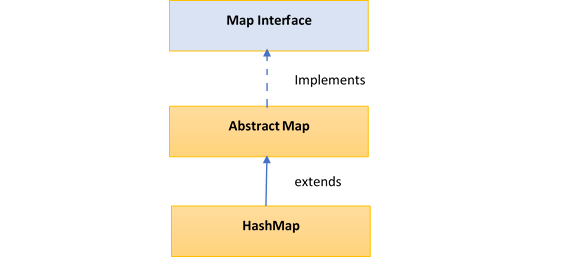
Hierarchy of HashMap class

  public class HashMap<K,V> extends AbstractMap<K,V>
                            implements Map<K,V>, Cloneable, Serializable
  { //implementation }
  

The HashMap class extends AbstractMap class which implements Map interface.

HashSet Class Hierarchy

Few important features of HashMap are:

  • HashMap is a part of java.util package.
  • HashMap doesn’t allow duplicate keys but allows duplicate values.
  • HashMap allows null key also but only once and multiple null values.
  • HashMap does not guarantee insertion order.
  • HashMap is not snychronized, hence it is not thread-safe.

Performance of HashMap depends on 2 parameters:

  • Initial Capacity
  • Load Factor

Constructors in HashMap

HashMap provides 4 constructors and access modifier of each is public:

  • HashMap() : It is the default constructor which creates an instance of HashMap with initial capacity 16 and load factor 0.75.
  • HashMap(int initial capacity) : It creates a HashMap instance with specified initial capacity and load factor 0.75.
  • HashMap(int initial capacity, float loadFactor) : It creates a HashMap instance with specified initial capacity and specified load factor.
  • HashMap(Map map) : It creates instance of HashMapwith same mappings as specified map.

Coding Examples of HashMap

1. Adding Key-Value in a HashMap
import java.util.HashMap;

public class HashMapPutExample
{
  public static void main(String[] args)
  {
      HashMap<Integer, String> map = new HashMap<>();
        
      map.put(1,  "Apple");
      map.put(2,  "Ball");
      map.put(3,  "Cat");
        
      System.out.println(map);
  }
}

Output

  {1=Apple, 2=Ball, 3=Cat}
2. Get a value from Key and remove a key in a HashMap
public static void main(String[] args)
  {
    HashMap<Integer, String> map = new HashMap<>();
      
    map.put(1,  "Apple");
    map.put(2,  "Ball");
    map.put(3,  "Cat");
    
    String valueOfAKey = map.get(2);
    System.out.println("The value of key : "+valueOfAKey);

    map.remove(2);
    System.out.println("Map after removing key 2 : "+map);
  }

Output

  The value of key : Ball
  Map after removing key 2 : {1=Apple, 3=Cat}
3. containsKey() and isEmpty() method in HashMap
public static void main(String[] args)
  {
    HashMap<Integer, String> map = new HashMap<>();
      
    map.put(1,  "Apple");
    map.put(2,  "Ball");
    map.put(3,  "Cat");
    
    //will return true if the key is present in hashmap
    System.out.println("is key present in Hashmap : "+map.containsKey(2)); 
    
    // will return false if the map is not empty
    System.out.println("is map empty : "+map.isEmpty()); 
  }
}

Output

  is key present in Hashmap : true
  is map empty : false
4. Iterate over a HashMap
public static void main(String[] args)
  {
    HashMap<Integer, String> map = new HashMap<>();
      
    map.put(1,  "Apple");
    map.put(2,  "Ball");
    map.put(3,  "Cat");

    System.out.println("**** Iterate over keys using keySet() ****");

    Iterator<Integer> keySetIterator = map.keySet().iterator();
      
    while (keySetIterator.hasNext())
    {
        Integer key = keySetIterator.next();
        String value = map.get(key);
          
        System.out.println("The key is : " + key + ", and value is : " + value );
    }
      
    System.out.println("**** Iterate over entries set ****");
      
    Iterator<Entry<Integer, String>> entrySetIterator = map.entrySet().iterator();
      
    while (entrySetIterator.hasNext())
    {
        Entry<Integer, String> entry = entrySetIterator.next();
          
        System.out.println("The key is : " + entry.getKey() + ", and value is : " +
                           entry.getValue() );
     }
  }

Output

**** Iterate over keys using keySet() ****
The key is : 1, and value is : Apple
The key is : 2, and value is : Ball
The key is : 3, and value is : Cat
 
**** Iterate over entries set ****
The key is : 1, and value is : Apple
The key is : 2, and value is : Ball
The key is : 3, and value is : Cat

Methods in HashMap Class

S.NoMethodDescription
1void clear()Removes all the key-value pairs from the HashMap.
2Object clone()Returns a shallow copy of the specified HashMap.
3boolean containsKey(Object key)Returns true or false based on whether the specified key is found in the map or not.
4boolean containsValue(Object Value)It is Similar to containsKey() method, it looks for the specified value instead of key.
5boolean isEmpty()Checks whether the map is empty.
6Object put(Key k, Value v)Inserts key-value pair into the HashMap.
7void putAll(Map m)copies all the elements of a map to the another specified map.
8int size()returns the size of the map which is equal to the number of key-value pairs stored in the HashMap.
9Object get(Object key)returns the value for the specified key in the HashMap.
10Collection values()returns a collection of all values in the map.
11Value remove(Object key)removes the key-value pair for the specified key.
12Set keySet()returns the Set of the all keys stored in the HashMap.

Difference between HashMap and HashTable | when to you use what ?

S.NoHashMapHashTable
1HashMap is non synchronized. It is not-thread safe and can’t be shared between many threads without proper synchronization codeHashtable is synchronized. It is thread-safe and can be shared with many threads.
2HashMap allows one null key and multiple null values.Hashtable doesn’t allow any null key or value.

HashMap is generally preferred over HashTable if thread synchronization is not needed.


Java – ArrayList Internal Implementation

Internally ArrayList in Java uses array to store its element. It’s an Object array which is defined as follows.

transient Object[] elementData;

1. Very First step : Declaration of ArrayList

When we declare an arraylist, we define a constructor, hence defining a capacity for the arraylist.

If we create Arraylist using Default constructor, then the capacity will be calculated in a way like this, see the code below:

      
public ArrayList() {
  this.elementData = DEFAULTCAPACITY_EMPTY_ELEMENTDATA;
}

where DEFAULTCAPACITY_EMPTY_ELEMENTDATA is defined as an empty array, like this, see the code below:

      
private static final Object[] DEFAULTCAPACITY_EMPTY_ELEMENTDATA = {}; 
      
private static final int DEFAULT_CAPACITY = 10;

If we create Arraylist constructor by passing the capacity, then the capacity will be calculated in a way like this, see the code below:

        
public ArrayList(int initialCapacity) {
  if (initialCapacity > 0) {
      this.elementData = new Object[initialCapacity];
  } else if (initialCapacity == 0) {
      this.elementData = EMPTY_ELEMENTDATA;
  } else {
      throw new IllegalArgumentException("Illegal Capacity: "+
                                        initialCapacity);
  }
}

See in the code above, the condition if(initialCapacity>0) then it will create an array elementData of size of that very capacity which was passed.

If we create ArrayList from another collection, then elements of passed collection are copied to elementData array.

        
elementData = c.toArray();

see the code below:

        
public ArrayList(Collection<? extends E> c) {
  elementData = c.toArray();
  if ((size = elementData.length) != 0) {
      if (elementData.getClass() != Object[].class)
          elementData = Arrays.copyOf(elementData, size, Object[].class);
  } else {
      // replace with empty array.
      this.elementData = EMPTY_ELEMENTDATA;
  }
}

If you see in this code above, you will notice that the elementData array(or passed collection) is converted to an array of type Object.

2. add() : What happens next when you add an element ?

The below code gets called.

        
public boolean add(E e) {
  ensureCapacityInternal(size + 1);  // Increments modCount!!
  elementData[size++] = e;
  return true;
}

which at first ensures the capacity of the arraylist, then adds the elements to the end of the list. If the capacity is exhausted a new array is created with 50% more capacity than the previous one. All the elements are also copied from previous array to new array.

        
private void ensureCapacityInternal(int minCapacity) {
  if (elementData == DEFAULTCAPACITY_EMPTY_ELEMENTDATA) {
      minCapacity = Math.max(DEFAULT_CAPACITY, minCapacity);
  }

  ensureExplicitCapacity(minCapacity);
}  

As you can see it’s here that the capacity is actually initialized as 10, if required to set to default.

          
private void ensureExplicitCapacity(int minCapacity) {
  modCount++;

  // overflow-conscious code
  if (minCapacity - elementData.length > 0)
      grow(minCapacity);
} 
  

From this code, if required, grow() method is called to increase the capacity of the ArrayList.

      
/**
* Increases the capacity to ensure that it can hold at least the
* number of elements specified by the minimum capacity argument.
*
* @param minCapacity the desired minimum capacity
*/
  private void grow(int minCapacity) {
      // overflow-conscious code
      int oldCapacity = elementData.length;
      int newCapacity = oldCapacity + (oldCapacity >> 1);
      if (newCapacity - minCapacity < 0) newCapacity = minCapacity; if (newCapacity - MAX_ARRAY_SIZE > 0)
          newCapacity = hugeCapacity(minCapacity);
      // minCapacity is usually close to size, so this is a win:
      elementData = Arrays.copyOf(elementData, newCapacity);
  }

As you can see right shift operator is used to increase the capacity by 50% in the following statement. int newCapacity = oldCapacity + (oldCapacity >> 1);

Also the elementData array is changed to have the new capacity, elements from the old array are also copied to the new array. elementData = Arrays.copyOf(elementData, newCapacity);

So that’s how internally ArrayList keeps on growing dynamically.

3. remove() : What happens when you remove an element ?

If you remove any element from an array then all the subsequent elements are to be shifted to fill the gap created by the removed element.

See the code below:

        
/**
* Removes the element at the specified position in this list.
* Shifts any subsequent elements to the left (subtracts one from their
* indices).
*/
public E remove(int index) {
    rangeCheck(index);

    modCount++;
    E oldValue = elementData(index);

    int numMoved = size - index - 1;
    if (numMoved > 0)
        System.arraycopy(elementData, index+1, elementData, index,
                        numMoved);
    elementData[--size] = null; // clear to let GC do its work

    return oldValue;
}   

So that is how an arraylist grows and reduces in size dynamically.

So here we are, we hope now you are confident and know how to use ArrayList in java.

We tried our best to simplify the explanation, if you feel any difference or you need help in understanding any such thing, then feel free to contact us through email and subscribe to ProgrammerToday.


Java – ArrayList

It is a resizable array or a dynamic array. It uses this dynamic array mechanism to store its elements. ArrayList class is found in the java.util package in java.

Hierarchy of ArrayList class

            
public class ArrayList<E> extends AbstractList<E> implements List<E>, 
                                  RandomAccess, Cloneable, Serializable  
            

Features of ArrayList

  • An ArrayList allows duplicate elements.
  • An ArrayList maintains the insertion order.
  • An ArrayList is not synchronized, hence not thread safe.
  • An ArrayList allows RandomAccess of elements as it implements the same interface functionality.
  • Insertion/deletion operation is a little slow if compared to a linkedList as arrayList does a lot of shifting of elements(being a resizable array).
  • The iterators returned by iterator and listIterator methods of ArrayList are fail-fast. Which means, if the list is structurally modified at any time after the iterator is created, in any way except through the iterator’s own remove or add methods, the iterator will throw a ConcurrentModificationException.

ArrayList Constructors

  1. ArrayList() : This is used to build an empty arrayList.
  2. ArrayList(int capacity) : This is used to build an array list that has the specified initial capacity.
  3. ArrayList(Collection <? extends E> c) : This is used to build an array list that is initialized with the elements of the collection c .

Coding Examples of HashMap


1. Declare & Add Items to ArrayList

import java.util.ArrayList; // import this class

public class TestArrayList { 
  public static void main(String[] args) { 
    ArrayList<String> vehicles = new ArrayList<String>();
    vehicles.add("Merc");
    vehicles.add("BMW");
    vehicles.add("Ford");
    vehicles.add("JLR");
    System.out.println(vehicles);
  } 
}

OUTPUT

[Merc, BMW, Ford, JLR]

2. Iterating Collection through the for-each loop

import java.util.*; 

class TraverseList{  
 public static void main(String args[]){  
  ArrayList<String> al=new ArrayList<String>();  
  al.add("Alpha");  
  al.add("Beta");  
  al.add("Gamma");  

  //Traversing list using for-each loop  
  for(String obj:al)  
    System.out.println(obj);  
  }  

 System.out.println("-------------");

 // Traversing list using java 8 forEach loop and lambda
  al.forEach(x -> {    // "x" can be replaced by any variable name
    System.out.println(x);
  });
}  

OUTPUT

Alpha
Beta
Gamma
-------------
Alpha
Beta
Gamma

3. set(), get(), isEmpty(), remove() methods of ArrayList

public static void main(String[] args) {
  
      List<String> groceryList = new ArrayList<String>();

       // Check if an ArrayList is empty
       System.out.println("Is the groceryList empty? : " + groceryList.isEmpty());

       groceryList.add("Deo");
       groceryList.add("Cookies");
       groceryList.add("Cereals");
       groceryList.add("Bread");
       groceryList.add("Cheese");

       // Find the size of an ArrayList
       System.out.println("Here is the grocery list of " + groceryList.size() +" items");
       System.out.println(groceryList);

       // Retrieve the element at a given index
       String perfume = groceryList.get(0);
       String lastItem = groceryList.get(groceryList.size() - 1);

       System.out.println("Best perfume: " + perfume);
       System.out.println("Last item in the list: " + lastItem);

       // Modify the element at a given index
       groceryList.set(4, "Amazon");
       System.out.println("Modified grocery list: " + groceryList);
       
       //remove the item from the list
       groceryList.remove(3);
       System.out.println("Grocery list after removing item 3: "+groceryList);
}

OUTPUT

Is the groceryList empty? : true
Here is the grocery list of 5 items
[Deo, Cookies, Cereals, Bread, Cheese]
Best perfume: Deo
Last item in the list: Cheese
Modified grocery list: [Deo, Cookies, Cereals, Bread, Amazon]
Grocery list after removing item 3: [Deo, Cookies, Cereals, Amazon]

4. ArrayList of User defined objects

import java.util.ArrayList;
import java.util.List;

class Employee {
    private String name;
    private int empId;

    public Employee(String name, int empId) {
        this.name = name;
        this.empId = empId;
    }

    public String getName() {
        return name;
    }

    public void setName(String name) {
        this.name = name;
    }

    public int getEmpId() {
        return empId;
    }

    public void setEmpId(int empId) {
        this.empId = empId;
    }
}

public class TestArraylist {
    public static void main(String[] args) {
        List<Employee> empList = new ArrayList<>();
        empList.add(new Employee("Jason", 30));
        empList.add(new Employee("Winston", 34));
        empList.add(new Employee("Bourne", 29));

        empList.forEach(Employee -> {
          System.out.println("Name : " + Employee.getName() + 
                             ", Employee Id : " + Employee.getEmpId());
        });
    }
}

OUTPUT

Name : Jason, Employee Id : 30
Name : Winston, Employee Id : 34
Name : Bourne, Employee Id : 29

Summary

So here we are, we hope now you are confident and know how to use ArrayList in java.

We tried our best to simplify the explanation, if you feel any difference or you need help in understanding any such thing, then feel free to contact us through email and subscribe to ProgrammerToday.


Java Collection Framework

Collection is a group of seperate objects represented as a single unit and collection framework is an architecture for representing and manipulating the collections.

Collection framework defines several interfaces,d Few of them are :

  • Collection Interface
  • List Interface
  • Set Interface
  • Queue Interface

Map Interface(though not exactly part of framework)

Few of the methods declared in the collection interface and overriden by the child classes

S.NoMethodUsage
1public boolean add(E e), addAll(Collection<? extends E> c)It is used to insert an element in this collection, the other is used to Insert one collection into another.
2public boolean remove(Object element), removeAll(Collection<?> c)used to delete an element, other is used to delete all elements of the collection
3public int size()returns total number of elements in the collection
4public boolean contains(Object element)used to search an element in the collection
5public int size()returns total number of elements in the collection
6public Iterator iterator()returns an iterator
7public boolean isEmpty()check collection for empty
8public int hashCode()returns hashcode of the collection

Iterable Interface

Few of the methods declared in the collection interface and overriden by the child classes

The Iterable interface is the root interface for all the collection classes. The Collection interface extends the Iterable interface and therefore all the subclasses of Collection interface also implement the Iterable interface.

It has only one abstract method:

 Iterator iterator() : 

and returns the iterator over the elements of type T.


Linkedlist

It is a linear data structure, unlike arrays it is not stored at contiguous location, the elements called nodes are linked using pointers, each pointer pointing to the next node.

Each node consists of mainly two part:

  • Data
  • Reference Link or address of next node and previous node

In java internally linkedlist is implemented using doubly linked list, in which we can add & remove elements from both sides of the list.

Features of LinkedList

  • Java LinkedList is an implementation of the List and Deque interfaces. It extends AbstractSequentialList and implements List and Deque interfaces.
  • It maintains the insertion order of the elements and also allow null elements.
  • In Java applications, we can use it as a List, stack or queue.
  • It does not support random access as it doesn’t implement RandomAccess Interface, so you cannot access elements randomly you have to access it sequentially(whereas Stack & ArrayList do implement this interface).
  • You can use ListIterator/Iterator to iterate LinkedList elements.

Different Ways to iterate over LinkedList

      
import java.util.LinkedList;
import java.util.Iterator;
public class ProgrammerTodayLinkedListExample{

  public static void main(String[] args) {

   LinkedList<String> list = new LinkedList<String>();
   list.add("welcome");
   list.add("to");
   list.add("LinkedList");
      
   System.out.println("*****Iterate Using Iterator*****");
   for (Iterator i = list.iterator(); i.hasNext();) {
     System.out.println(i.next());
   }
   
   System.out.println("*****Iterate Using ListIterator*****");
   ListIterator<String> listIterator = linkedList.listIterator();
   while (listIterator.hasNext()) {
     System.out.println(listIterator.next());
   }
   
   System.out.println("*****Iterate Using Traditional for loop*****");
   for (int i = 0; i < list .size(); i++) {
     System.out.println(list .get(i));
   }
    
   System.out.println("*****Iterate using Java8 forEach loop*****");
   // forEach Performs the given action for each element of the Iterable until 
   // all elements have been processed or the action throws an exception.
   linkedList.forEach(System.out::println); 
  }
}

OUTPUT

    
*****Iterate Using Iterator*****
welcome
to
LinkedList
*****Iterate Using ListIterator*****
welcome
to
LinkedList
*****Iterate Using Traditional for loop*****
welcome
to
LinkedList
*****Iterate using Java8 forEach loop*****
welcome
to
LinkedList    
    

LinkedList as Deque

Observe below in code block that on the left is the Deque Interface reference which creates a LinkedList object on the right. By this way linkedList can inherit Deque methods like addFirst(), addLast(), removeFirst(), removeLast(), etc methods.

    
import java.util.LinkedList;
import java.util.Deque;

public class LinkedListDequeExample 
{
  public static void main(String[] args) 
  {
  Deque<String> listDeque= new LinkedList<String>();
  listDeque.add(2);
  listDeque.addFirst(1);
  listDeque.addLast(3);
  listDeque.addFirst(0);
  listDeque.addLast(4);
      
  System.out.println("LinkedList contents : " + listDeque);
  System.out.println("LinkedList size : " + listDeque.size());
  listDeque.removeFirst();
  listDeque.removeLast();
  
  System.out.println("LinkedList contents : " + listDeque);
  System.out.println("LinkedList size : " + listDeque.size());	
  }
}

OUTPUT

      
  LinkedList contents : [0, 1, 2, 3, 4]
  LinkedList size : 5
  LinkedList contents : [1, 2, 3]
  LinkedList size : 3
  

LinkedList to Streams in Java 8

In java 8 use streams with forEach loop to iterate over the linkedlist.

    
List<Integer> ptlist= new LinkedList<>();
ptlist.add(11);
ptlist.add(22);
ptlist.add(33);
  
//Using stream to iterate through the List
ptlist.stream().forEach(System.out::println);
  

OUTPUT

    
11
22
33 
  

Difference between ArrayList and LinkedList | Usage

S.NoArrayListLinkedList
1Insertions & deletions are slowerInsertions & deletions are easy and fast in LinkedList because there is no resizing like arrays and then copying to another array if it gets full.
2Memory overhead is less as compared to LL as it stores only the dataMemory overhead is more as it stores both address and data
3Accessing an element in an array is fastwhile Linked list takes linear time(i.e have to start from the head), so it is quite a bit slower
4Arrays are of fixed sizeLinked lists are dynamic and flexible and can expand and contract its size
5In an array, memory is assigned during compile timewhile in a Linked list it is allocated during execution or runtime
4Arrays are of fixed sizeLinked lists are dynamic and flexible and can expand and contract its size

Example : Reverse a LinkedList without creating another one(without using additional space)

Algorithm:

  1. Create a linked list with n elements.
  2. Run the loop for n/2 times where ‘n’ is the number of elements in the linkedlist.
  3. In the first pass, Swap the first and nth element.
  4. In the second pass, Swap the second and (n-1)th element and so on till you reach the mid of the linked list.
  5. Return the linked list after loop termination.
      
import java.util.*; 

public class LinkedListTest2 { 
public static void main(String[] args) 
{ 
    // Declaring linkedlist without any initial size 
    LinkedList<Integer> linkedli = new LinkedList<Integer>(); 

    // Appending elements at the end of the list 
    linkedli.add(new Integer(1)); 
    linkedli.add(new Integer(2)); 
    linkedli.add(new Integer(3)); 
    linkedli.add(new Integer(4)); 
    linkedli.add(new Integer(5)); 
    System.out.print("Elements before reversing: " + linkedli); 

    // Calling user defined function for reversing 
    linkedli = reverseLinkedList(linkedli); // or use Collections.reverse(linkedli); 
    System.out.print("\nElements after reversing: " + linkedli); 
} 

// Takes a linkedlist as a parameter and returns a reversed linkedlist 
public static LinkedList<Integer> reverseLinkedList(LinkedList<Integer> llist) 
{ 
    for (int i = 0; i < llist.size() / 2; i++) { 
        Integer temp = llist.get(i); 
        llist.set(i, llist.get(llist.size() - i - 1)); 
        llist.set(llist.size() - i - 1, temp); 
    } 

    // Return the reversed arraylist 
    return llist; 
} 
} 

Time Complexity: O(n/2)
Space Complexity: O(1)

Output:

Elements before reversing: [1, 2, 3, 4, 5]
Elements after reversing: [5, 4, 3, 2, 1]

Good To Know – Internal working of LinkedList

Click “Internals of LinkedList” to Read More …