
It is a java class which provides basic implimentation of Map Interface and stores the data in (key,value) pairs. HashMap is called HashMap because it works on the prinicple of hashing.
Keys are unique and cannot be duplicated, though a value can be mapped to multiple keys meaning it can be duplicated.
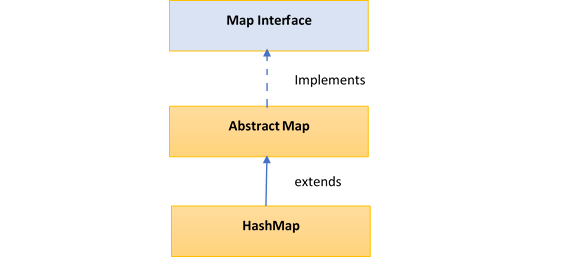
Hierarchy of HashMap class
  public class HashMap<K,V> extends AbstractMap<K,V>
                            implements Map<K,V>, Cloneable, Serializable
  { //implementation }
The HashMap class extends AbstractMap class which implements Map interface.
Few important features of HashMap are:
- HashMap is a part of java.util package.
- HashMap doesn’t allow duplicate keys but allows duplicate values.
- HashMap allows null key also but only once and multiple null values.
- HashMap does not guarantee insertion order.
- HashMap is not snychronized, hence it is not thread-safe.
Performance of HashMap depends on 2 parameters:
- Initial Capacity
- Load Factor
Constructors in HashMap
HashMap provides 4 constructors and access modifier of each is public:
- HashMap() : It is the default constructor which creates an instance of HashMap with initial capacity 16 and load factor 0.75.
- HashMap(int initial capacity) : It creates a HashMap instance with specified initial capacity and load factor 0.75.
- HashMap(int initial capacity, float loadFactor) : It creates a HashMap instance with specified initial capacity and specified load factor.
- HashMap(Map map) : It creates instance of HashMapwith same mappings as specified map.
Coding Examples of HashMap
1. Adding Key-Value in a HashMap
import java.util.HashMap;

public class HashMapPutExample
{
  public static void main(String[] args)
  {
      HashMap<Integer, String> map = new HashMap<>();

      map.put(1,  "Apple");
      map.put(2,  "Ball");
      map.put(3,  "Cat");

      System.out.println(map);
  }
}
Output
{1=Apple, 2=Ball, 3=Cat}
2. Get a value from Key and remove a key in a HashMap
public static void main(String[] args)
  {
    HashMap<Integer, String> map = new HashMap<>();

    map.put(1,  "Apple");
    map.put(2,  "Ball");
    map.put(3,  "Cat");

    String valueOfAKey = map.get(2);
    System.out.println("The value of key : "+valueOfAKey);

    map.remove(2);
    System.out.println("Map after removing key 2 : "+map);
  }
Output
  The value of key : Ball
  Map after removing key 2 : {1=Apple, 3=Cat}
3. containsKey() and isEmpty() method in HashMap
public static void main(String[] args)
  {
    HashMap<Integer, String> map = new HashMap<>();

    map.put(1,  "Apple");
    map.put(2,  "Ball");
    map.put(3,  "Cat");

    //will return true if the key is present in hashmap
    System.out.println("is key present in Hashmap : "+map.containsKey(2));

    // will return false if the map is not empty
    System.out.println("is map empty : "+map.isEmpty());
  }
}
Output
  is key present in Hashmap : true
  is map empty : false
4. Iterate over a HashMap
public static void main(String[] args)
  {
    HashMap<Integer, String> map = new HashMap<>();

    map.put(1,  "Apple");
    map.put(2,  "Ball");
    map.put(3,  "Cat");

    System.out.println("**** Iterate over keys using keySet() ****");

    Iterator<Integer> keySetIterator = map.keySet().iterator();

    while (keySetIterator.hasNext())
    {
        Integer key = keySetIterator.next();
        String value = map.get(key);

        System.out.println("The key is : " + key + ", and value is : " + value );
    }

    System.out.println("**** Iterate over entries set ****");

    Iterator<Entry<Integer, String>> entrySetIterator = map.entrySet().iterator();

    while (entrySetIterator.hasNext())
    {
        Entry<Integer, String> entry = entrySetIterator.next();

        System.out.println("The key is : " + entry.getKey() + ", and value is : " +
                           entry.getValue() );
     }
  }
Output
**** Iterate over keys using keySet() ****
The key is : 1, and value is : Apple
The key is : 2, and value is : Ball
The key is : 3, and value is : Cat

**** Iterate over entries set ****
The key is : 1, and value is : Apple
The key is : 2, and value is : Ball
The key is : 3, and value is : Cat
Methods in HashMap Class
| S.No | Method | Description |
|---|---|---|
| 1 | void clear() | Removes all the key-value pairs from the HashMap. |
| 2 | Object clone() | Returns a shallow copy of the specified HashMap. |
| 3 | boolean containsKey(Object key) | Returns true or false based on whether the specified key is found in the map or not. |
| 4 | boolean containsValue(Object Value) | It is Similar to containsKey() method, it looks for the specified value instead of key. |
| 5 | boolean isEmpty() | Checks whether the map is empty. |
| 6 | Object put(Key k, Value v) | Inserts key-value pair into the HashMap. |
| 7 | void putAll(Map m) | copies all the elements of a map to the another specified map. |
| 8 | int size() | returns the size of the map which is equal to the number of key-value pairs stored in the HashMap. |
| 9 | Object get(Object key) | returns the value for the specified key in the HashMap. |
| 10 | Collection values() | returns a collection of all values in the map. |
| 11 | Value remove(Object key) | removes the key-value pair for the specified key. |
| 12 | Set keySet() | returns the Set of the all keys stored in the HashMap. |
Difference between HashMap and HashTable | when to you use what ?
| S.No | HashMap | HashTable |
|---|---|---|
| 1 | HashMap is non synchronized. It is not-thread safe and can’t be shared between many threads without proper synchronization code | Hashtable is synchronized. It is thread-safe and can be shared with many threads. |
| 2 | HashMap allows one null key and multiple null values. | Hashtable doesn’t allow any null key or value. |
HashMap is generally preferred over HashTable if thread synchronization is not needed.