
Java – HashSet Class

The Hashset class implements the Set interface. The underlying data structure for hashset is the hashtable The insertion order is not maintained in Set, Objects are inserted based on hashcodes. It allows to store null elements.

Hierarchy of HashSet class

public class HashSet<E> extends AbstractSet<E> 
                        implements Set<E>, Cloneable, Serializable
{ //implementation }

The HashSet class extends AbstractSet class which implements Set interface. The Set interface inherits Collection and Iterable interfaces in hierarchical order.
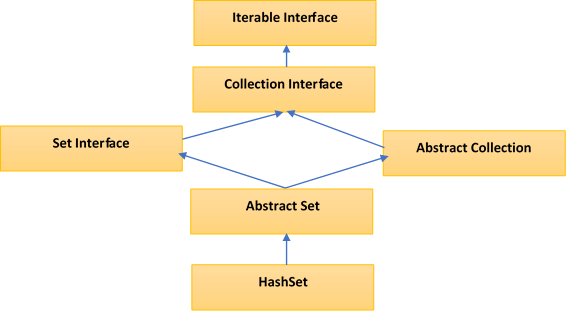
HashSet Class Hierarchy

HashSet Constructors

  1. HashSet hs = new HashSet();
    Default initial capacity is 16 and default load factor is 0.75.
  2. HashSet hs = new HashSet(int initialCapacity);
    initializes a HashSet with a specified capacity.
  3. HashSet hs = new HashSet(int initialCapacity, float loadFactor);
    initializes a HashSet with a specified capacity and load factor (0.75)
  4. HashSet hs = new HashSet(Collection C);
    It is used to initialize HashSet with the elements of Collection(Eg: an arraylist)
Initial Capacity

Initial Capacity means the number of buckets in the HashSet(internally backing HashMap) when it is created and ofcourse the number of buckets will increase automatically if the current size gets full.

By Default : the initial capacity is 16, we can override this by passing the capacity in one of its Constructors like this : HashSet(int initialCapacity).

Load Factor

The load factor is a measure of how full the HashSet is allowed to get before its capacity is automatically increased and the Default load factor is 0.75.

There is a threshold before the backing hashtable gets rehashed. So when the number of entries in the hash table exceeds the threshold (which is the product of the load factor and the current capacity), then the hash table is rehashed (which means, internal data structures are rebuilt) so that the hash table has approximately twice the number of buckets.

By Default : In the HashSet, the internal capacity is 16 and load factor is 0.75. The number of buckets will automatically get increased when the table has 12 elements(16 X 0.75) in it.

Internal working of a HashSet

All the classes of Set interface internally backed up by Map. HashSet uses HashMap for storing its object internally. You must be wondering that to enter a value in HashMap we need a key-value pair, but in HashSet we are passing only one value.

Storage in HashMap

Actually the value we insert in HashSet acts as key to the map Object and for its value java uses a constant variable. So in key-value pair all the keys will have same value

If we look at add() method of HashSet class:

public boolean add(E e)
{
   return map.put(e, PRESENT) == null;
}
/* Where PRESENT is a Dummy value to associate with an Object in Map
   private static final Object PRESENT = new Object(); */

Methods in HashSet Class

S.NoMethodDescription
1boolean add​(E e)This method Adds the specified element to the set if it is not already present. Important : This method internally uses equals() method, so it the element is duplicate it is not added to the set.
2boolean contains​(Object o)Returns true if this set contains the specified element else returns false
3boolean isEmpty()Returns true if this set contains no elements.
4boolean remove​(Object o)Removes the specified element from this set if it is present.
5void clear()Removes all of the elements from this set.
6Object clone()Returns a shallow copy of this HashSet instance: the elements themselves are not cloned.
7Iterator iterator()Returns an iterator over the elements in this set.
8int size()Returns the number of elements in this set (its cardinality).
9Spliterator spliterator()Creates a late-binding and fail-fast Spliterator over the elements in this set.

Coding Examples

1. Add, remove and iterate over HashSet
  //1.Create HashSet
  HashSet<String> hs = new HashSet<>();
   
  //2.Add elements to HashSet
  hs.add("Apple");
  hs.add("Ball");
  hs.add("Cat");
  hs.add("Dog");
  hs.add("Elephant");
   
  System.out.println("HashSet : "+hs);
   
  //3.Check if element exists
  boolean found = hs.contains("Apple");  //true
  System.out.println("Found : "+found);
   
  //4.Remove an element
  hs.remove("Dog");
   
  //5.Iterate over values
  Iterator<String> itr = hs.iterator();
  System.out.println("HashSet After removal of Dog -") 
  while(itr.hasNext())
  {
      String value = itr.next(); 
      System.out.println("Value: " + value);
  }
  

Output

    HashSet : [Apple, Ball, Cat, Dog, Elephant]
    Found : true
    HashSet After removal of Dog - 
    Value: Apple
    Value: Ball
    Value: Cat
    Value: Elephant
2. Create HashSet from another Collection
  public static void main(String args[]){  
  ArrayList<String> list=new ArrayList<String>();  
      list.add("Apple");  
      list.add("Ball");  
        
      HashSet<String> hs=new HashSet(list);  
      hs.add("Cat");  
      Iterator<String> i=hs.iterator();  
      while(i.hasNext())  
      {  
      System.out.println(i.next());  
      }  
  } 
    

Output

    Apple
    Ball
    Cat
3. Convert HashSet to ArrayList using java 8 Stream Apis
    HashSet<String> hs = new HashSet<>();
      hs.add("Apple");
      hs.add("Ball");
      hs.add("Cat");
        
      List<String> arrayList = hs.stream().collect(Collectors.toList());
        
      System.out.println(arrayList);
    

Output

      [Apple, Ball, Cat] 

When to use HashSet ?

Yes developers may also use ArrayList for storing elements, But in Scenarios where you want to have distinct elements with no duplicates, use of HashSet will be very useful.

Difference between HashSet and TreeSet

S.NoHashSetTreeSet
1For operations like search, insert and delete. It takes constant time for these operations on average. HashSet is faster than TreeSet. HashSet is Implemented using a hash tableTreeSet takes O(Log n) for search, insert and delete which is higher than HashSet. But TreeSet keeps sorted data. TreeSet is implemented using a Self Balancing Binary Search Tree (Red-Black Tree). TreeSet is backed by TreeMap in Java.
2Elements in HashSet are not ordered.maintains objects in Sorted order defined by either Comparable or Comparator method in Java. TreeSet elements are sorted in ascending order by default.
3HashSet allows null objectTreeSet doesn’t allow null Object and throw NullPointerException, Why, because TreeSet uses compareTo() method to compare keys and compareTo() will throw java.lang.NullPointerException.
4HashSet uses equals() method to compare two object in Set and for detecting duplicates.TreeSet uses compareTo() method for same purpose. If equals() and compareTo() are not consistent, i.e. for two equal object equals should return true while compareTo() should return zero, than it will break contract of Set interface and will allow duplicates in Set implementations like TreeSet

Java – ArrayList

It is a resizable array or a dynamic array. It uses this dynamic array mechanism to store its elements. ArrayList class is found in the java.util package in java.

Hierarchy of ArrayList class

            
public class ArrayList<E> extends AbstractList<E> implements List<E>, 
                                  RandomAccess, Cloneable, Serializable  
            

Features of ArrayList

  • An ArrayList allows duplicate elements.
  • An ArrayList maintains the insertion order.
  • An ArrayList is not synchronized, hence not thread safe.
  • An ArrayList allows RandomAccess of elements as it implements the same interface functionality.
  • Insertion/deletion operation is a little slow if compared to a linkedList as arrayList does a lot of shifting of elements(being a resizable array).
  • The iterators returned by iterator and listIterator methods of ArrayList are fail-fast. Which means, if the list is structurally modified at any time after the iterator is created, in any way except through the iterator’s own remove or add methods, the iterator will throw a ConcurrentModificationException.

ArrayList Constructors

  1. ArrayList() : This is used to build an empty arrayList.
  2. ArrayList(int capacity) : This is used to build an array list that has the specified initial capacity.
  3. ArrayList(Collection <? extends E> c) : This is used to build an array list that is initialized with the elements of the collection c .

Coding Examples of HashMap


1. Declare & Add Items to ArrayList

import java.util.ArrayList; // import this class

public class TestArrayList { 
  public static void main(String[] args) { 
    ArrayList<String> vehicles = new ArrayList<String>();
    vehicles.add("Merc");
    vehicles.add("BMW");
    vehicles.add("Ford");
    vehicles.add("JLR");
    System.out.println(vehicles);
  } 
}

OUTPUT

[Merc, BMW, Ford, JLR]

2. Iterating Collection through the for-each loop

import java.util.*; 

class TraverseList{  
 public static void main(String args[]){  
  ArrayList<String> al=new ArrayList<String>();  
  al.add("Alpha");  
  al.add("Beta");  
  al.add("Gamma");  

  //Traversing list using for-each loop  
  for(String obj:al)  
    System.out.println(obj);  
  }  

 System.out.println("-------------");

 // Traversing list using java 8 forEach loop and lambda
  al.forEach(x -> {    // "x" can be replaced by any variable name
    System.out.println(x);
  });
}  

OUTPUT

Alpha
Beta
Gamma
-------------
Alpha
Beta
Gamma

3. set(), get(), isEmpty(), remove() methods of ArrayList

public static void main(String[] args) {
  
      List<String> groceryList = new ArrayList<String>();

       // Check if an ArrayList is empty
       System.out.println("Is the groceryList empty? : " + groceryList.isEmpty());

       groceryList.add("Deo");
       groceryList.add("Cookies");
       groceryList.add("Cereals");
       groceryList.add("Bread");
       groceryList.add("Cheese");

       // Find the size of an ArrayList
       System.out.println("Here is the grocery list of " + groceryList.size() +" items");
       System.out.println(groceryList);

       // Retrieve the element at a given index
       String perfume = groceryList.get(0);
       String lastItem = groceryList.get(groceryList.size() - 1);

       System.out.println("Best perfume: " + perfume);
       System.out.println("Last item in the list: " + lastItem);

       // Modify the element at a given index
       groceryList.set(4, "Amazon");
       System.out.println("Modified grocery list: " + groceryList);
       
       //remove the item from the list
       groceryList.remove(3);
       System.out.println("Grocery list after removing item 3: "+groceryList);
}

OUTPUT

Is the groceryList empty? : true
Here is the grocery list of 5 items
[Deo, Cookies, Cereals, Bread, Cheese]
Best perfume: Deo
Last item in the list: Cheese
Modified grocery list: [Deo, Cookies, Cereals, Bread, Amazon]
Grocery list after removing item 3: [Deo, Cookies, Cereals, Amazon]

4. ArrayList of User defined objects

import java.util.ArrayList;
import java.util.List;

class Employee {
    private String name;
    private int empId;

    public Employee(String name, int empId) {
        this.name = name;
        this.empId = empId;
    }

    public String getName() {
        return name;
    }

    public void setName(String name) {
        this.name = name;
    }

    public int getEmpId() {
        return empId;
    }

    public void setEmpId(int empId) {
        this.empId = empId;
    }
}

public class TestArraylist {
    public static void main(String[] args) {
        List<Employee> empList = new ArrayList<>();
        empList.add(new Employee("Jason", 30));
        empList.add(new Employee("Winston", 34));
        empList.add(new Employee("Bourne", 29));

        empList.forEach(Employee -> {
          System.out.println("Name : " + Employee.getName() + 
                             ", Employee Id : " + Employee.getEmpId());
        });
    }
}

OUTPUT

Name : Jason, Employee Id : 30
Name : Winston, Employee Id : 34
Name : Bourne, Employee Id : 29

Summary

So here we are, we hope now you are confident and know how to use ArrayList in java.

We tried our best to simplify the explanation, if you feel any difference or you need help in understanding any such thing, then feel free to contact us through email and subscribe to ProgrammerToday.


Java Collection Framework

Collection is a group of seperate objects represented as a single unit and collection framework is an architecture for representing and manipulating the collections.

Collection framework defines several interfaces,d Few of them are :

  • Collection Interface
  • List Interface
  • Set Interface
  • Queue Interface

Map Interface(though not exactly part of framework)

Few of the methods declared in the collection interface and overriden by the child classes

S.NoMethodUsage
1public boolean add(E e), addAll(Collection<? extends E> c)It is used to insert an element in this collection, the other is used to Insert one collection into another.
2public boolean remove(Object element), removeAll(Collection<?> c)used to delete an element, other is used to delete all elements of the collection
3public int size()returns total number of elements in the collection
4public boolean contains(Object element)used to search an element in the collection
5public int size()returns total number of elements in the collection
6public Iterator iterator()returns an iterator
7public boolean isEmpty()check collection for empty
8public int hashCode()returns hashcode of the collection

Iterable Interface

Few of the methods declared in the collection interface and overriden by the child classes

The Iterable interface is the root interface for all the collection classes. The Collection interface extends the Iterable interface and therefore all the subclasses of Collection interface also implement the Iterable interface.

It has only one abstract method:

 Iterator iterator() : 

and returns the iterator over the elements of type T.